
12 best generative AI testing tools (2026): Ranked and reviewed for QA engineers


tldr: Generative AI testing moved from demos to production pipelines. The tools that matter now use agentic testing, video-to-code, and self-healing to replace brittle scripts with intent-based QA. Here are 12 ranked by what holds up in real CI/CD.
The testing tools you picked last year are already outdated
Selenium is still everywhere. It defined browser automation, and its WebDriver protocol became a W3C standard. Playwright replaced it technically (using CDP instead of WebDriver), but Selenium's patterns and mental models still influence how most teams think about test automation. It's not going away. But the layer on top of raw browser protocols is changing fast.
A year ago, most "AI testing" tools were wrappers around GPT that generated flaky Cypress scripts. You'd spend an hour cleaning up what the AI produced, then another hour debugging why it failed in CI. The value proposition was shaky.
That's shifted. The newer tools use vision models that interpret your UI the way a human tester would. They navigate dynamically instead of following hardcoded selectors. When your team redesigns the settings page, the test finds the new path to the same outcome. Some tools call this agentic testing. Others call it self-healing. The labels vary. The capability is real, when it works.
The problem: most tools still don't work reliably in production CI/CD. They demo well on a clean todo app. They break on your actual product with auth flows, modals, and third-party iframes.
This ranking focuses on what holds up in real pipelines, not what looks good in a 3-minute walkthrough.
Scope note: This list is weighted toward browser-based E2E and visual regression, but includes mobile-native (#9 Maestro) and LLM evaluation (#11 Promptfoo) because no honest 2026 testing list can ignore them. Accessibility-specific tooling and synthetic data generation are addressed in "What's not on this list" below.
Tool | Best for | Core tech | Pricing model |
|---|---|---|---|
Applitools | Visual regression | Visual AI | ~$10K-50K/yr |
Bug0 Studio | Agentic E2E and video-to-code | Playwright + vision models | ~$250/mo (usage) |
QA Wolf | Done-for-you service | Human + AI hybrid | ~$5K+/mo |
Testim / Tricentis | Enterprise legacy | Smart locators | ~$30K-100K/yr |
Qodo (formerly CodiumAI) | Unit test generation | Code analysis | Free / $30/user/mo |
Mabl | Low-code teams | SaaS cloud | ~$499/mo |
Functionize | Data-heavy apps | ML engine | ~$20K-60K/yr |
Diffblue | Java unit testing | AI code gen | ~$500/seat/yr |
Maestro | Mobile-native testing | Accessibility tree + YAML DSL | Open source / ~$250/mo per device |
Percy | Visual snapshots | Pixel comparison | ~$399/mo |
Promptfoo | LLM output evaluation | Assertion framework | Open source / enterprise custom |
Checkie.AI (now Testers.AI) | Autonomous testing agent | Vision AI | ~$1,777/yr |
How we ranked these tools
Three criteria matter when evaluating generative AI testing tools. Everything else is noise.
Agentic capabilities
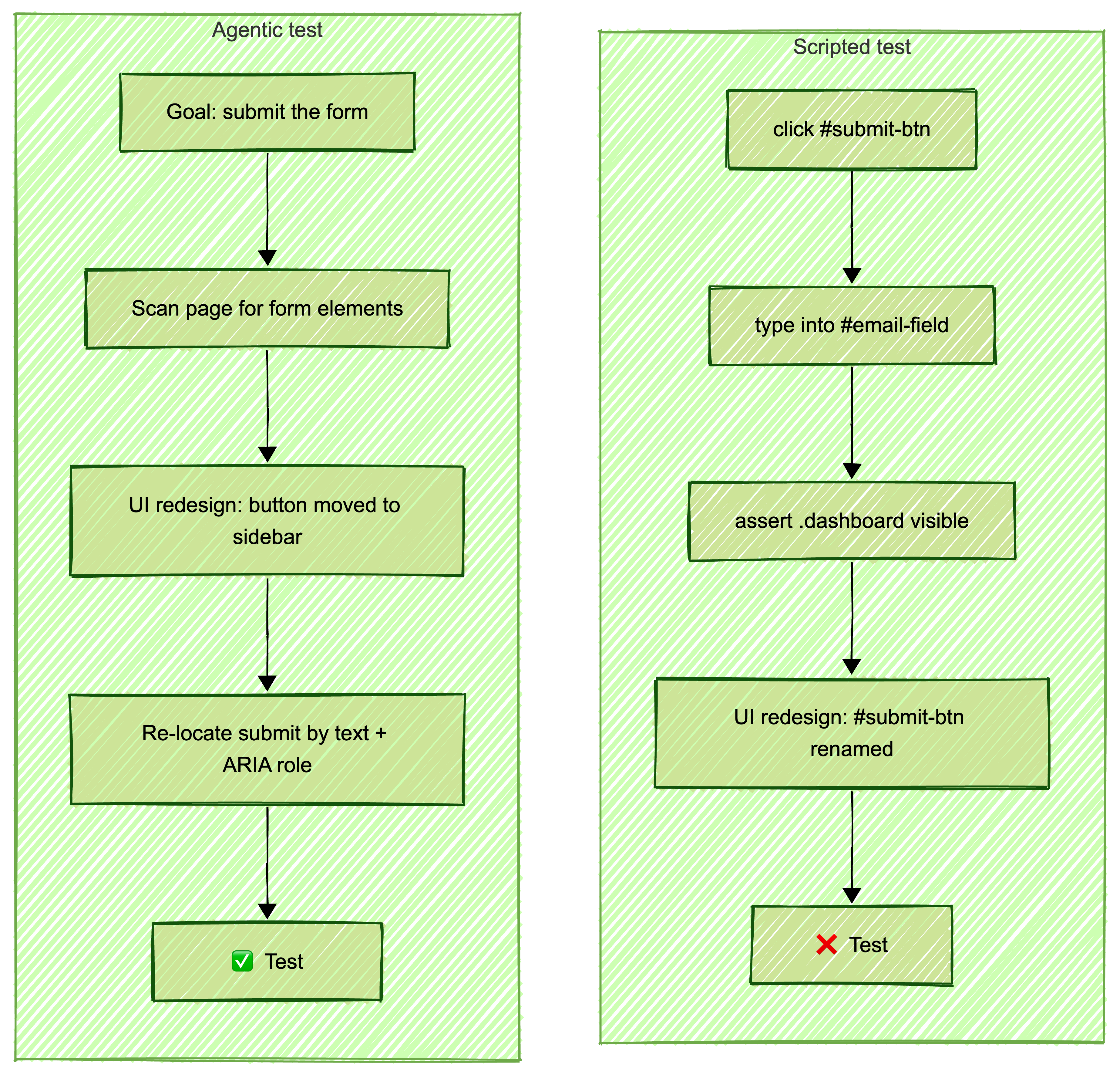
Can the tool explore your UI without hardcoded steps? Agentic testing means the AI navigates your application like a real user. It reads the screen, decides where to click, and adapts when the layout changes. Most tools still require you to define every step. A few actually think for themselves.
The difference matters in practice. A traditional test says "click the button with id submit-btn." An agentic test says "submit the form." When your designer renames that button or moves it to a different section, the agentic test still works. The traditional test breaks.
Self-healing tests
Every tool claims self-healing. Few deliver it. Real self-healing means when your #add-to-cart button becomes .btn-cart, the test updates its own selectors and passes on the next run. No alerts. No manual fixes. 90% of tools claim this capability. Maybe 20% handle it reliably in production CI/CD runs.
We evaluated each tool by running identical UI changes against their test suites and measuring how many tests survived without human intervention.
Tech stack and lock-in
Does the tool generate standard Playwright code, or does it lock you into a proprietary format you can never leave? This matters more than most teams realize. If you build 500 tests on a platform that uses a custom DSL, you're stuck. If it generates Playwright under the hood, your tests have value beyond the vendor.
We also factored in pricing model. The industry is moving from flat SaaS subscriptions to usage-based billing (per test minute, per agent hour, per inference call). When comparing tools, we normalized to cost-per-test-run rather than sticker price. A tool at $250/month that runs 200 tests and a tool at $2,000/month that runs 5,000 tests have very different unit economics.
#1: Applitools (best for visual AI)
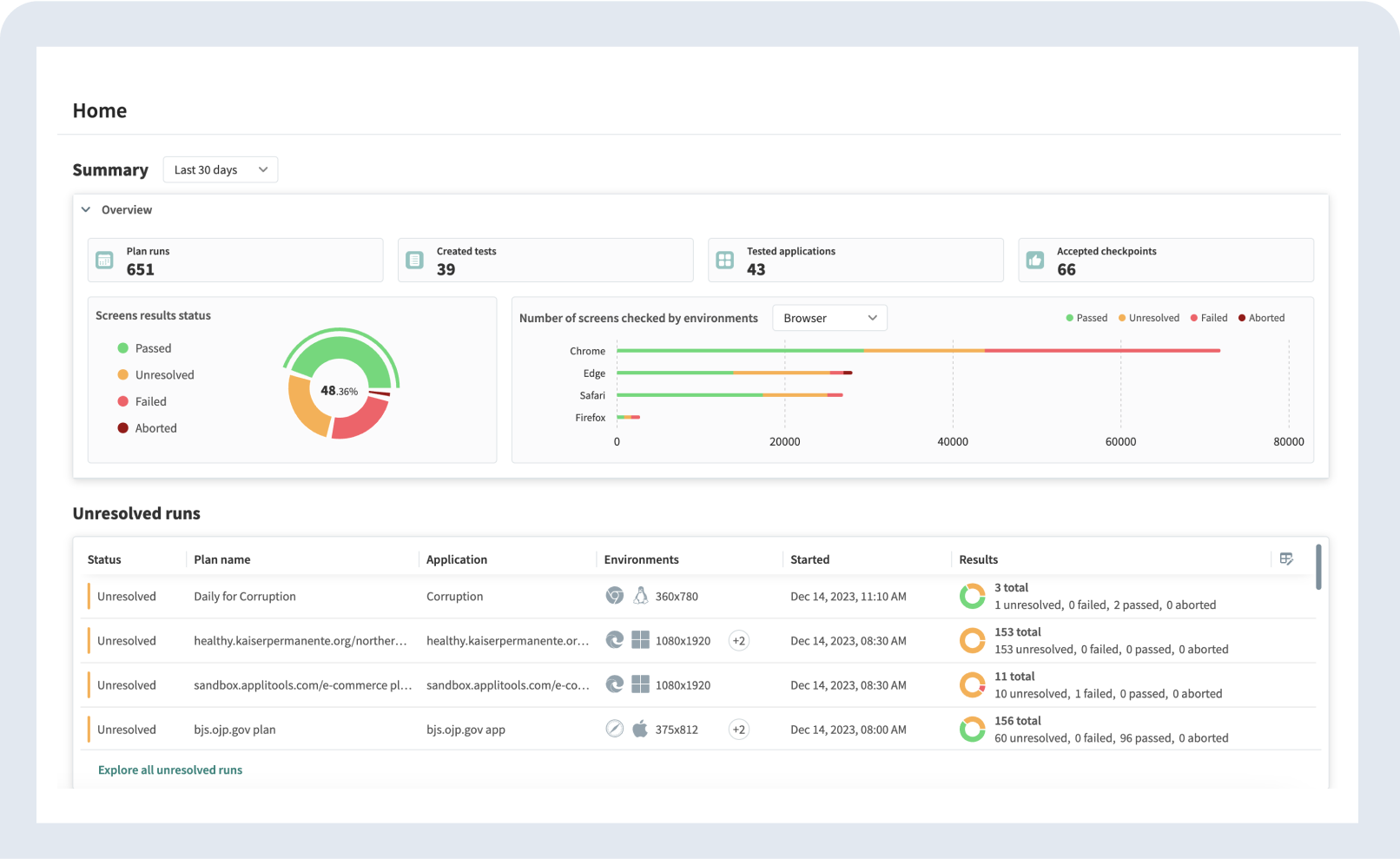
Applitools built visual AI testing before the rest of the industry cared about it. Their "Eyes" technology compares screenshots across builds, browsers, and viewports using AI that understands layout rather than pixel-matching. It catches the visual regressions that functional tests miss entirely.
Starting price: Custom enterprise (typically $10K-50K/year depending on test volume and browser matrix)
Best for: Teams with existing test suites who need visual regression coverage across browsers and devices.
Applitools earns the #1 spot because of maturity and reliability. They've been solving visual testing for years, and their AI has been trained on millions of screenshots. The Ultrafast Grid runs your visual checks across dozens of browser/viewport combinations in seconds, not minutes.
Their root cause analysis feature (shipped originally in 2018, refined since) surfaces the DOM and CSS differences behind visual failures. When a test fails, the platform shows which specific CSS property or DOM change caused the layout shift. That saves your team 15-20 minutes per failure investigation.
What works:
Visual AI that distinguishes meaningful layout changes from harmless rendering differences
Ultrafast Grid renders across dozens of browser/viewport/device combinations in parallel
Integrates with Playwright, Cypress, Selenium, and most existing frameworks
Root cause analysis that surfaces the specific CSS or DOM change behind visual regressions
What doesn't:
You still need to write the test scripts yourself. Applitools validates what you see, not what you do
Enterprise pricing puts it out of reach for startups and small teams
Setup requires SDK integration into your existing test framework
No test generation. It's a validation layer, not a creation tool
The verdict: If your users see it, Applitools catches it. But you still need another tool to generate the tests in the first place.
#2: Bug0 Studio (best for agentic E2E and video-to-code)
Bug0 Studio takes three types of input (plain English, video uploads, browser screen recordings) and converts them into Playwright-based test steps. The platform runs tests on its own infrastructure and auto-heals selectors when UI changes break locators.
Starting price: ~$250/month (pay-as-you-go for test minutes, scales with usage)
Best for: Engineering teams that want to generate E2E tests from recordings or natural language without writing Playwright code themselves.
The video-to-code feature is the main differentiator. You record yourself walking through a user flow. The AI produces a Playwright test from the recording. Other tools attempt this, but most generate outputs that need significant manual cleanup before they pass in CI. Bug0's output tends to be closer to runnable on the first attempt, though complex flows with auth tokens or multi-step modals still need editing.
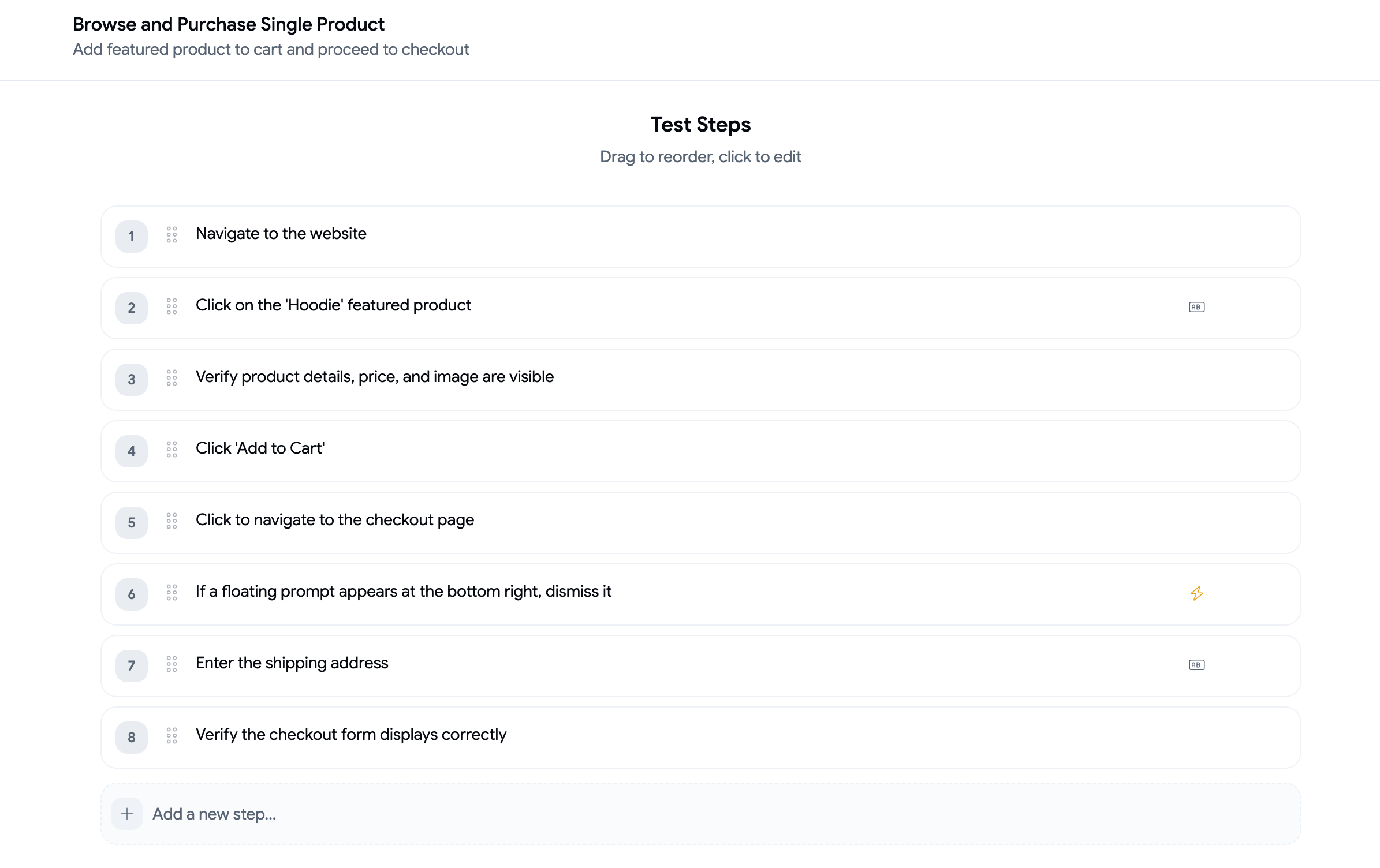
The agentic testing angle is real but worth qualifying. When you write a step like "complete the checkout flow," the AI agent navigates your app dynamically rather than replaying exact coordinates. If the checkout page gets redesigned, the agent looks for the new path. It works well for standard flows (forms, navigation, CRUD operations). It struggles with highly custom UI patterns and edge cases the way any AI agent does.
Self-healing runs during scheduled and manual test runs. When a selector breaks, the AI updates the locator. When it can't fix it, you get an alert. The failure mode is explicit, which matters more than the success rate.
It's a younger platform than most on this list, which cuts both ways. Fast iteration on features, but less battle-testing in large-scale production environments.
What works:
Video-to-code produces Playwright tests that are close to runnable from screen recordings
Natural language test creation lowers the barrier for non-Playwright teams
Failed test reports include video, AI analysis, network logs, and console traces
GitHub Actions integration for CI/CD
What doesn't:
Newer platform with a smaller community. Less Stack Overflow coverage when you hit edge cases
Tests run on Bug0's infrastructure only. You can't export standalone Playwright scripts and can't debug tests locally in VS Code the way you would with standard Playwright
No self-serve signup yet. Requires a demo call to get started
Complex auth flows and custom UI components still need manual step editing
The verdict: The strongest option for generating E2E tests from video or natural language. The trade-off is platform maturity and vendor lock-in on test execution. Worth a trial if your team doesn't have Playwright expertise in-house.
#3: QA Wolf (best for service-based hybrid)
QA Wolf isn't a tool. It's a service. You don't write tests. They do.
Starting price: Custom pricing (typically $5K+/month)
Best for: Teams that want test coverage without any involvement in test creation or maintenance.
QA Wolf pairs human QA engineers with AI automation to deliver end-to-end test suites. You get coverage. They handle everything: planning, writing, maintaining, and verifying test results. Their pitch is simple. You build features. They make sure nothing breaks.
The model works well for teams that don't have QA headcount and don't want to hire. You get a dedicated team that writes Playwright tests, maintains them when UI changes, and reviews every failure before it reaches your engineers.
What works:
Zero maintenance burden on your team. They own the test suite end-to-end
Human verification of every failure. No false positives reaching your developers
Strong Playwright expertise. Tests are well-structured and reliable
Guaranteed coverage timelines
What doesn't:
Expensive for smaller teams. The service model has higher minimums than self-serve tools
Less control over test creation. You're trusting their judgment on what to test
Slower iteration. Requesting new tests means going through their team, not clicking a button
Dependency on their capacity. Scaling up means waiting for their availability
The verdict: If you'd rather buy results than operate tools, QA Wolf delivers. The trade-off is cost and control. Compare this to Bug0 Studio if you want the same AI-powered testing but with self-serve control at a lower price point.
#4: Testim by Tricentis (best for enterprise stability)
Testim is the tool your procurement team already approved.
Starting price: Custom enterprise (typically $30K-100K+/year depending on seat count and modules licensed)
Best for: Large organizations (500+ employees) with existing Tricentis contracts or compliance-driven QA processes.
Tricentis acquired Testim in early 2022 for $200M and integrated it into their enterprise suite alongside Tosca and qTest. (Testim remains a separately branded, actively maintained product.) The specific feature that matters: Smart Locators. These use a weighted algorithm across multiple element attributes (text content, CSS class, XPath, surrounding DOM structure, visual position) to identify elements. When one attribute changes, the locator falls back to the others. The practical result: fewer false failures from routine UI changes compared to single-attribute selectors.
In practice, Smart Locators handle straightforward UI changes well (button text changes, class renames, minor layout shifts). They struggle when multiple attributes change simultaneously, like during a major redesign. That's the gap between "adaptive locators" and actual agentic testing.
The platform also includes Testim's root cause analysis feature, which groups related test failures and identifies the likely source commit. This works through Git integration, not AI inference. It's useful when 15 tests break from one deploy and you need to know which PR caused it.
What works:
Smart Locators using weighted multi-attribute element identification reduce false failures
Root cause analysis links test failures to specific commits via Git integration
SOC2, SAML SSO, RBAC, audit logs. The full enterprise compliance checklist
Embedded in the Tricentis ecosystem (Tosca, qTest, NeoLoad) if you already use their stack
What doesn't:
Tricentis ships major feature updates quarterly. Smaller competitors iterate weekly
Pricing is five or six figures annually. You're paying for the enterprise wrapper
Initial setup involves professional services. Expect 4-8 weeks to full deployment
The AI features (test generation from NLP) were added post-acquisition and feel bolted on compared to the core locator tech
The verdict: If you already use Tricentis products or your security team requires vendor questionnaires with SOC2 Type II attestation, Testim is the path of least resistance. The AI capabilities are real but conservative. You're buying reliability, not innovation.
#5: Qodo (formerly CodiumAI) (best for unit testing and developer workflows)
Qodo (rebranded from CodiumAI in September 2024) solves a different problem than the other tools on this list. It generates unit and integration tests, not browser-based E2E tests.
Starting price: Free tier (75 credits/month). Teams at $30/user/month.
Best for: Individual developers who want AI-generated unit tests inside their IDE.
Qodo Gen (formerly Codiumate) analyzes your code and generates test cases that cover edge cases, boundary conditions, and error paths. It works inside VS Code and JetBrains IDEs, generating tests as you write code. The AI understands your function signatures, dependencies, and logic flow to produce meaningful tests.
This is valuable for improving code-level coverage. But it doesn't replace E2E testing. Qodo won't tell you if your checkout flow breaks after a deploy. It tells you if your calculateTotal() function handles null inputs correctly.
What works:
Fast, contextual unit test generation inside the IDE
Good at finding edge cases developers miss
Free tier (75 credits/month) is generous enough for individual use
Supports Python, JavaScript, TypeScript, Java, and more
What doesn't:
Not an E2E testing tool. No browser automation. No visual testing
Generated tests sometimes need manual adjustment for complex business logic
Doesn't integrate with CI/CD as a standalone QA solution
Limited value for QA teams. This is a developer tool
The verdict: Great for developers who want better unit test coverage. Wrong tool for QA engineers evaluating E2E solutions. Include it in your developer toolkit, but don't count on it as your testing strategy.
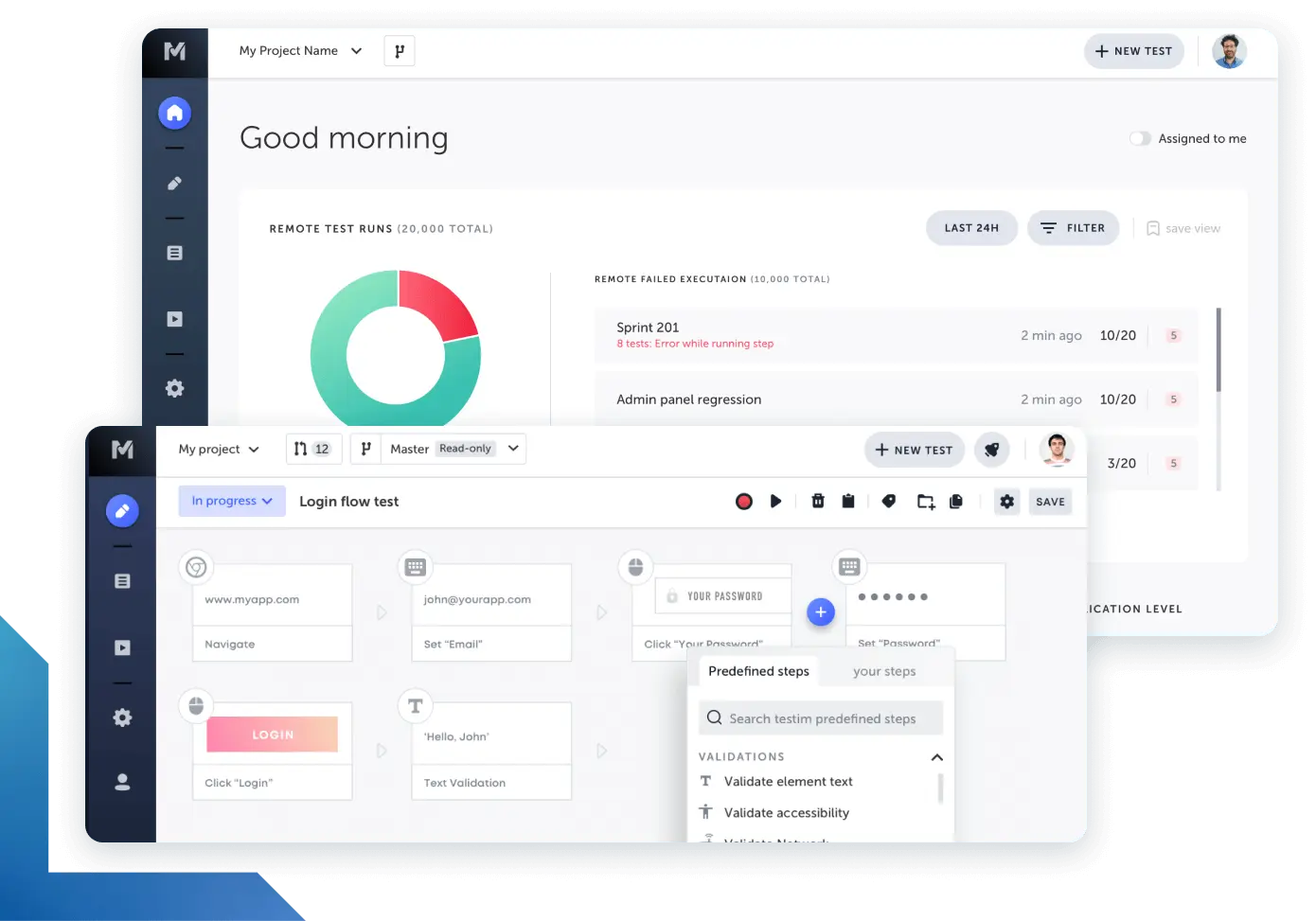
#6: Mabl (best for low-code testing)
Mabl makes test automation accessible to people who don't write code. That's its strength and its ceiling.
Starting price: Around $499/month for small teams
Best for: Teams transitioning from manual testing to automation, with non-technical QA members.
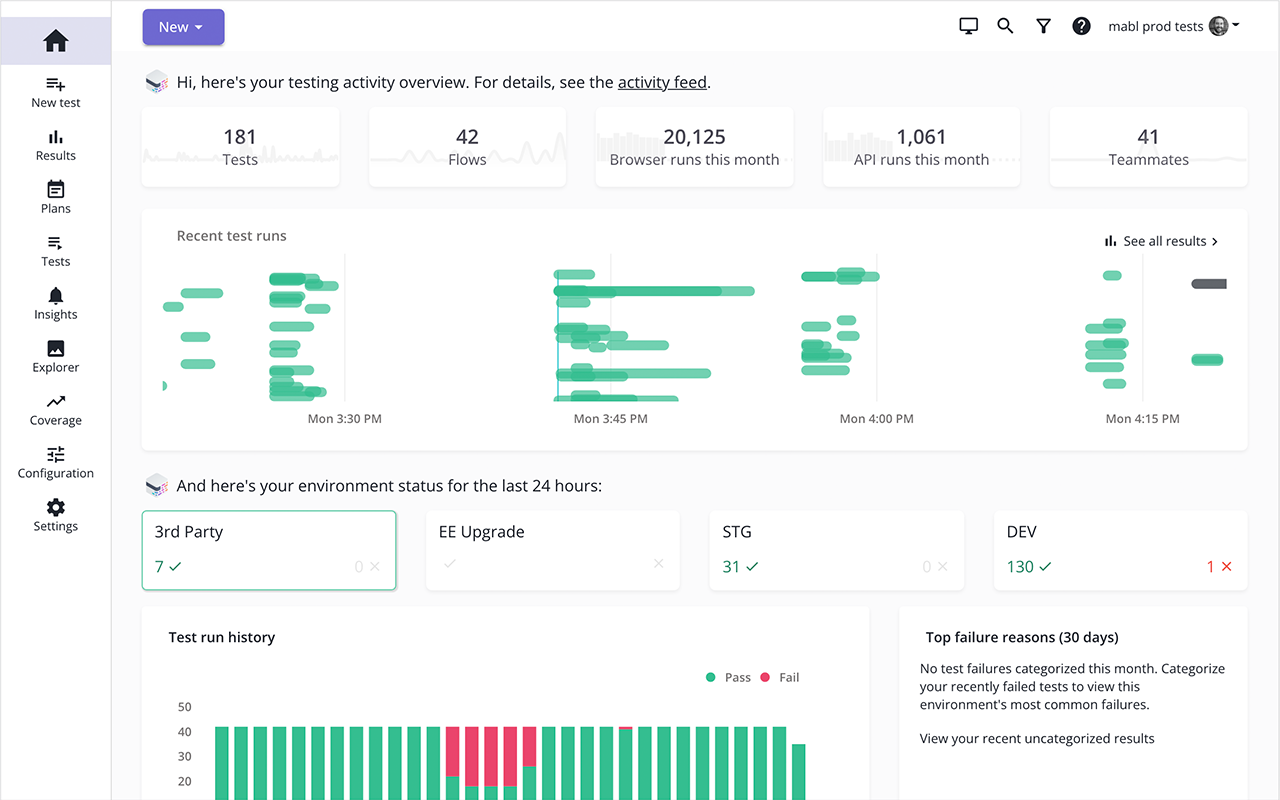
Mabl's visual test builder lets you create tests by clicking through your application. The platform records your actions and generates tests with built-in assertions. AI-powered auto-healing updates selectors when elements change. It runs tests in Mabl's cloud, so there's no infrastructure to manage.
The onboarding experience is genuinely good. Non-technical QA team members can create meaningful tests within hours. The learning curve is shallow by design.
What works:
Visual test builder requires zero coding
Auto-healing keeps tests running after UI changes
Cloud execution with no infrastructure management
Good onboarding for non-technical team members
What doesn't:
Pricing scales up quickly as test volume grows
Limited flexibility for complex testing scenarios
You'll hit the ceiling fast if your application has intricate workflows
Proprietary format. Your tests live in Mabl. No easy migration path
The verdict: Solid training wheels for test automation. If your team is new to automated testing, Mabl gets you started quickly. But expect to outgrow it within 12-18 months as your testing needs mature.
#7-#12: Six more tools worth knowing
#7: Functionize (best for data-heavy applications)
Functionize runs ML models against your historical test execution data to predict which tests are likely to fail after a given code change. The platform prioritizes test runs based on risk scoring, so your CI pipeline runs the most relevant tests first.
Starting price: Custom enterprise (typically $20K-60K/year based on test volume).
The core feature is adaptive test maintenance. Functionize tracks how your application's DOM structure changes over time and uses that history to update selectors before they break, not after. This works better than reactive self-healing for applications with predictable change patterns (e.g., a dashboard that adds new widgets regularly). NLP-based test creation is available but inconsistent. The plain-English-to-test conversion works for simple flows. Multi-step workflows with conditional logic need manual scripting.
The verdict: Useful if your bottleneck is test prioritization across a large suite (500+ tests). The ML-based risk scoring saves CI minutes. But the enterprise-only pricing and 6-8 week onboarding make it hard to justify unless your test suite is already large enough to benefit from intelligent prioritization.
#8: Diffblue (best for Java unit testing)
Diffblue Cover automatically writes unit tests for Java code. It analyzes your codebase and generates JUnit tests that achieve high code coverage. The company raised $6.3M in late 2024 from existing investors and remains independently operated, focused exclusively on Java.
Starting price: Per-seat licensing (typically $500+/seat/year).
The verdict: If your stack is Java and you need unit test coverage fast, Diffblue does it better than any general-purpose AI. Useless for anything else.
#9: Maestro (best for mobile-native agentic testing)
Maestro is the closest thing to Playwright-style agentic testing for iOS and Android. You write flows in a YAML-based DSL, and the framework navigates native UI elements without relying on brittle XPath selectors. It reads the screen's accessibility tree and matches elements by label, type, and hierarchy.
Starting price: Open source (free). Maestro Cloud starts at ~$250/month per device for CI execution.
The framework includes auto-wait logic that adapts to animation timing and network latency. MaestroGPT can help generate YAML flows, but the primary authoring experience is YAML, not natural language. (The team actually built and shut down a pure NL testing product, concluding that declarative YAML was more reliable.) It handles the problem that kills most Appium tests: timing flakiness on real devices. The limitation is ecosystem. Maestro's community is smaller than Playwright's, and complex gestures (multi-finger swipe, drag-and-drop) still need manual scripting.
The verdict: If you ship mobile apps alongside your web product, Maestro is the only tool on this list that covers native iOS/Android. Open source core keeps costs low. But expect to invest in writing flows manually. The AI generation layer isn't as mature as web-side tools.
#10: Percy by BrowserStack (best for visual snapshot testing)
Percy captures screenshots of your application during test runs and flags visual differences between builds. BrowserStack acquired Percy to complement their browser testing infrastructure.
Starting price: Starts at ~$399/month for the Team plan. Free tier includes 5,000 monthly screenshots.
Percy integrates with your existing test framework (Playwright, Cypress, Selenium) and adds a visual review layer. The review UI lets your team approve or reject visual changes per build.
The verdict: A lighter, cheaper alternative to Applitools for teams that need visual regression coverage without the enterprise pricing. Less sophisticated AI, but covers the basics.
#11: Promptfoo (best for LLM output evaluation)
Promptfoo is an open-source framework for testing LLM outputs. If your product includes AI features (chatbots, summarization, search), you need to verify that model responses are accurate, safe, and consistent. Promptfoo runs test suites against your prompts and scores responses on criteria like factual accuracy, toxicity, and format compliance.
Starting price: Open source (free). Promptfoo Enterprise for team collaboration uses custom pricing.
This isn't browser testing. It's a different category entirely. But including it matters because the biggest QA challenge for many teams isn't "does the button work" but "does the AI hallucinate." Promptfoo lets you define assertions like "response must not contain PII" or "answer must reference only provided context documents" and runs them against hundreds of prompt variations. Red teaming presets test for jailbreaks and safety violations out of the box.
The verdict: If you ship LLM-powered features, you need an evaluation framework alongside your browser E2E suite. Promptfoo is the most accessible option: open source, CLI-first, and integrates with CI/CD via an official GitHub Action. Different category than the other tools here, but arguably more critical for teams building AI products.
#12: Checkie.AI / Testers.AI (best for autonomous AI agent testing)
Checkie.AI rebranded to Testers.AI and now positions itself as a "virtual test team." It uses vision AI agents to test web applications by looking at the screen rather than parsing the DOM.
Starting price: Core Coverage at $1,777/year. Pro at $4,777/year.
The vision-first approach means it can test applications that resist traditional automation (heavy canvas rendering, complex SVGs, WebGL). The rebrand reflects a shift from pure vision testing to a broader autonomous testing agent that covers functionality, performance, and security.
The verdict: No longer early access but still a small player. Worth evaluating if your application has unusual rendering that breaks traditional DOM-based automation.
What's not on this list (but should be on your radar)
This ranking includes mobile (#9 Maestro) and LLM evaluation (#11 Promptfoo) alongside the browser-focused tools. Three categories still didn't make the cut but affect most teams.
Accessibility testing under the European Accessibility Act
The European Accessibility Act (EAA) enforcement started in mid-2025. If you serve EU customers, automated accessibility testing is a compliance requirement, not a nice-to-have. axe-core handles rule-based a11y checks. The newer tools (Evinced, accessiBe's CI scanner, and Arc Toolkit) use AI to detect issues that rule-based systems miss: poor color contrast in dynamic themes, keyboard navigation dead ends, screen reader incompatibility in SPAs. None of the 12 tools above handle this well. You need a dedicated a11y layer in your pipeline. Budget for it separately.
Synthetic test data generation
Most AI testing tools focus on scripts and ignore the data problem. Your E2E tests need realistic user data: names, emails, addresses, payment details. Using production data in staging is a PII risk. Hardcoding test data makes tests brittle and tightly coupled to specific database states. Tools like Tonic.ai, Gretel, and Snaplet generate synthetic datasets that match your production schema without exposing real user data. If your test failures are caused by bad test data more often than bad scripts, this is where to invest first.
Pricing models are shifting under you
The pricing models on this list still mostly reflect the SaaS subscription era. The industry is moving toward usage-based billing: cost per test minute, per agent hour, or per inference call. When comparing tools, normalize costs to "price per test run on my actual app" rather than comparing monthly stickers. Per-inference cost starts with the model's own rate, and our LLM API pricing comparison has the current per-million-token figures for every Claude, GPT, and Gemini model a tool might be driving underneath. A tool at $200/month that runs 100 tests and a tool at $2,000/month that runs 10,000 tests have very different unit economics. Ask vendors for their cost-per-test-run on your specific application before signing anything.
Glossary: What the marketing terms actually mean
Every vendor uses these terms. Most define them loosely. Here's what to look for when a tool claims each capability.
Agentic testing
A test system that receives a goal and decides the navigation steps at runtime. Concrete example: you write "add an item to the cart and check out." The agent opens your app, finds a product (even if the product grid layout changed since last run), clicks "Add to cart," navigates to checkout, and fills the form. If your team moves the cart icon from the header to a sidebar, the agent locates it in the new position. The key distinction from record-and-replay: agentic tests don't store a fixed sequence of DOM interactions. They re-plan each run.
Self-healing
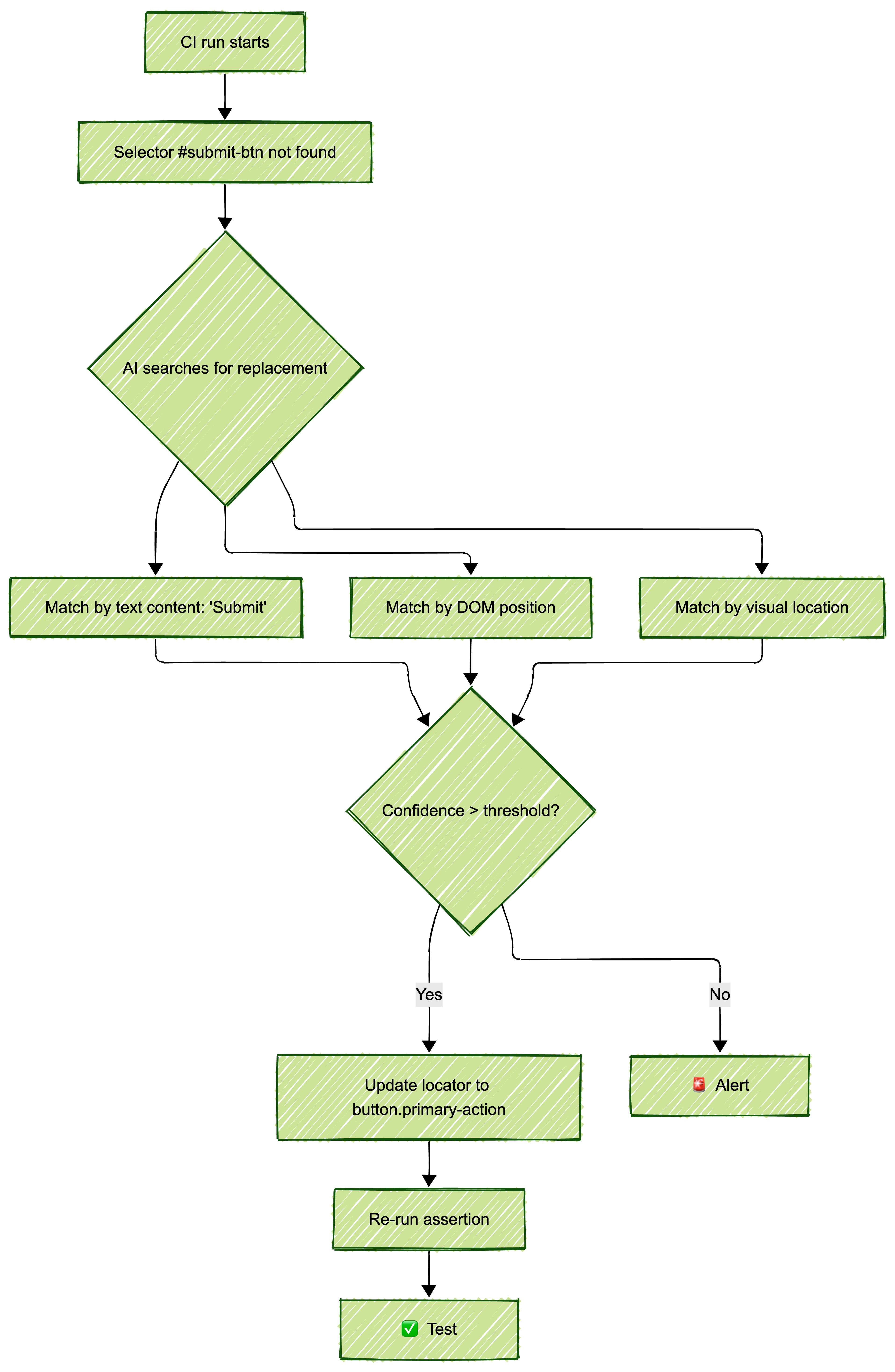
The test runner detects that a selector (#submit-btn) no longer matches any element, searches for the most likely replacement (maybe button.primary-action or the button with text "Submit"), updates the locator, and passes. This happens during the CI run, not after a human intervenes. When evaluating vendors, ask: "What's your self-heal success rate on production UI changes, not demo apps?" Most won't give you a number. The ones that do are worth talking to.
Video-to-code
You record a Loom (or any screen recording) of yourself completing a user flow. The tool's vision model watches the recording frame-by-frame, identifies each interaction (clicks, typing, scrolling, waiting for elements to load), and outputs a Playwright test script. The practical test: upload a 60-second recording of your actual app's login-to-dashboard flow. If the output passes without edits, the tool works. If you spend 20 minutes fixing selectors and adding waits, it doesn't.
Generative AI in software testing
AI that creates complete, new test cases rather than assisting with ones you've already written. The distinction matters: Copilot autocompleting your expect() statement is AI-assisted testing. A tool that analyzes your app's routes and produces 50 test cases covering happy paths, error states, and edge cases is generative AI in software testing. The output is a full test suite, not a code suggestion.
Intent-based testing
Writing test assertions as outcomes ("user sees confirmation page with order number") rather than implementation steps (await page.waitForSelector('.order-confirmation'); expect(page.locator('.order-id')).toBeVisible()). The testing system translates the intent into specific DOM interactions based on the current state of the page. When the confirmation page gets redesigned, the intent stays the same. The implementation steps update automatically.
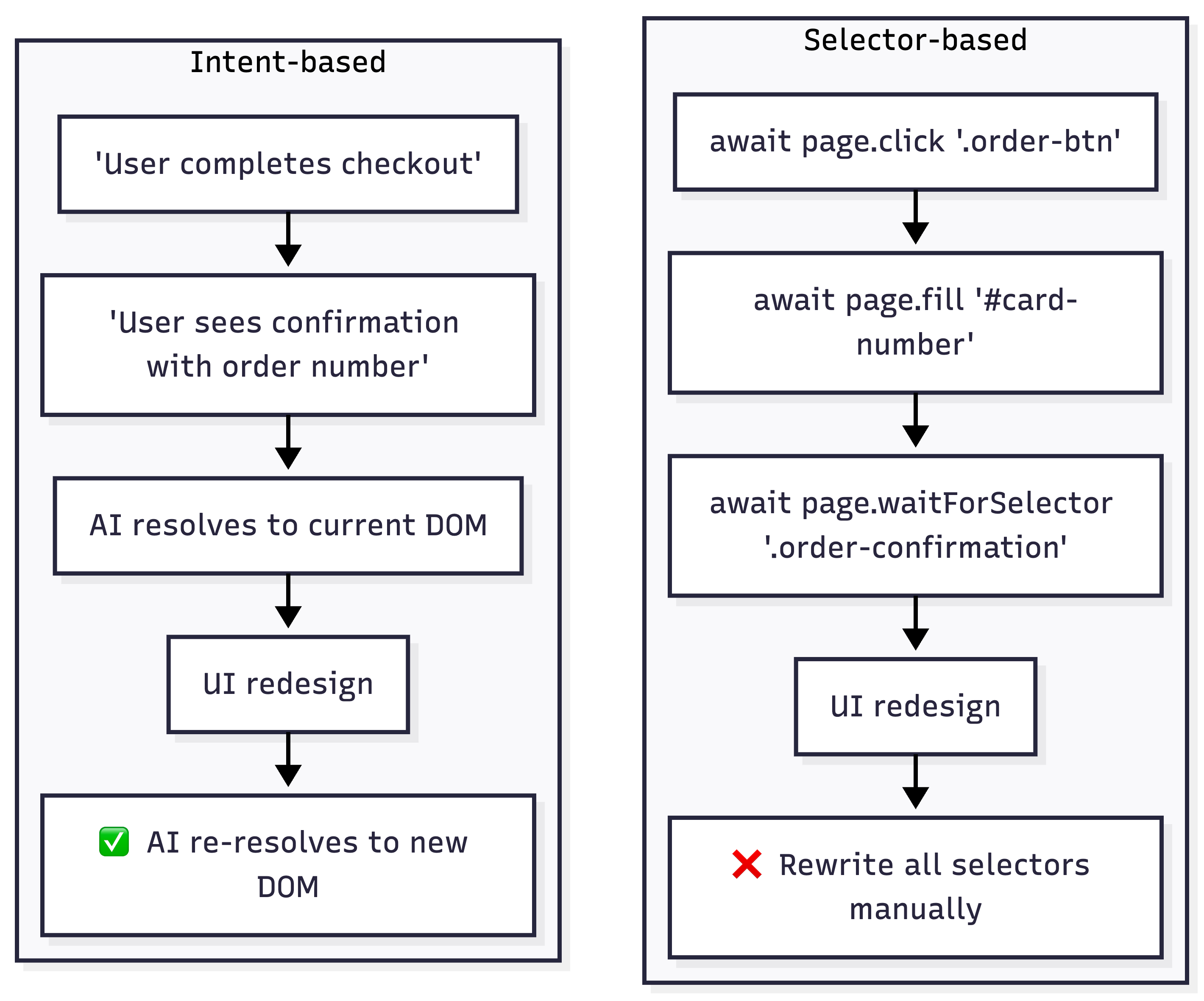
Stop writing scripts, start auditing results
The generative AI testing tools market has real options now, not just demos. The right choice depends on your constraint.
If pixel-perfect UI matters most, Applitools remains the gold standard for visual regression. Pair it with any test generation tool.
If you want to describe tests in English or record a video and get working Playwright suites, Bug0 Studio is the strongest option for agentic testing and video-to-code.
If you want zero involvement in testing, QA Wolf and similar managed services handle everything. You pay more, but you do less.
If enterprise procurement drives your decisions, Testim by Tricentis checks every compliance box.
The common thread across the best tools: they test intent, not implementation. They heal when UI changes. They generate Playwright code, not proprietary scripts. Your job isn't to write tests anymore. It's to define what "working" means and let the tools prove it.
FAQs
What is generative AI testing?
AI that produces complete test cases from inputs like natural language, video recordings, or application analysis. The "generative" part distinguishes it from AI-assisted testing (like Copilot autocompleting your test code). A generative tool takes "test the login flow with invalid credentials" and outputs a full Playwright script with navigation, input, submission, and error assertion. You run it. It either passes or it doesn't.
How is agentic testing different from traditional test automation?
Traditional automation stores a fixed sequence: click #login-btn, type into #email-field, assert .dashboard is visible. If any selector changes, the test fails. Agentic testing stores the goal: "log in and verify the dashboard loads." At runtime, the agent inspects the current page, identifies the login form regardless of its selectors, fills it, and checks the result. The practical difference shows up after a UI redesign. Traditional tests need manual updates. Agentic tests re-plan the steps automatically. The limitation: agents still fail on ambiguous UIs where multiple valid paths exist, or when your app requires non-obvious interaction patterns.
Do video-to-code tools actually work in production?
Run this test yourself: record a 90-second flow through your actual app (not a demo). Include a login, at least one form interaction, and a page navigation. Upload it to the tool. If the generated test passes in CI without edits, the tool works for your use case. In our evaluation, most tools required 15-40 minutes of manual cleanup per recording on real applications. A few produced near-runnable output. The variable is your app's complexity, specifically dynamic content, custom components, and third-party embeds are where video-to-code breaks down.
Can AI testing replace QA engineers?
It replaces the tasks nobody wants to do: maintaining 300 selectors, re-running regression suites manually, writing boilerplate test setup. It doesn't replace the judgment calls. Deciding which flows are critical, interpreting whether a visual change is intentional or a bug, understanding that "the button works but the UX is confusing"… those need a human. The teams getting the most value use AI for coverage and repetition while their QA engineers focus on test strategy, exploratory testing, and release decisions.
Which tool should I choose for my team?
Start with your biggest problem, not the most impressive demo. If your tests break every sprint from UI changes, you need self-healing (Applitools, Bug0 Studio, Testim). If you have no tests at all, you need generation (Bug0 Studio, Qodo, Mabl). If you don't have anyone to own the test suite, you need a service (QA Wolf). If your procurement process takes 6 months and you need to start now, pick a tool with a free tier (Qodo, Maestro) and evaluate enterprise options in parallel.
How much does Bug0 Studio cost?
Starts at ~$250/month pay-as-you-go for test minutes. Scales with usage. Unlimited tests, test suites, and AI credits included. Bug0 Managed (done-for-you QA with dedicated engineers) starts at ~$2,500/month flat. For comparison, Applitools runs $10K-50K/year, Testim/Tricentis runs $30K-100K/year, and QA Wolf starts around $5K/month.
What should I test during a vendor evaluation?
Don't use the vendor's demo app. Record your actual application's most complex user flow, the one that breaks the most. Upload it or describe it in natural language. Run the generated test in your staging environment. Then change something in the UI (rename a button, move a section) and run the test again without updating it. That second run tells you whether the self-healing actually works. Most vendors will happily demo on their own app. The ones that let you test on yours during the evaluation are the ones worth shortlisting.
About the author
Co-founder, Hashnode and currently building Buildful and Bug0.


