
The best local LLMs for coding in 2026, and the hardware each one needs
Here are thirteen open-weight coding models sorted by the memory they need, each with its Ollama tag, tool calling support, context window, and license.

tldr: If you have 16 GB of memory, run gpt-oss-20b. On 24 to 32 GB, run Qwen3.8-27B, the best local coding model in 2026, and keep Muse Glimmer-30B as the runner-up. Both are Apache 2.0. With 80 GB or more, gpt-oss-120b fits, and Qwen3.8-Flash-Next needs most of 128 GB. If none of these fit your machine, the bigger open-weight models run in the cloud on Buildful.
What decides which model you can run?
It comes down to memory. On a Mac that's the unified memory your CPU and GPU share, and on a PC it's the VRAM on your graphics card. If a model doesn't fit, Ollama spills the rest into system RAM, but generation slows to a crawl once that happens.
Most of Ollama's default tags are 4-bit quantizations, and a 4-bit file comes out at roughly a quarter to a third of the size of the 16-bit weights. You can see this on Ollama's tags page for Qwen3.8-Flash-Next, which is 355 GB at bf16 and 120 GB at q4_K_M. Treat the download size as the floor, because your operating system and the model's context cache need room on top of it.
The context cache is the part people forget. Ollama doesn't load a model with its full window. Instead, its context-length docs set the default by how much VRAM you have, with 4K tokens under 24 GiB, 32K from 24 to 48 GiB, and 256K above that.
Ollama's own Claude Code guide asks for 64K or more. That means an agent on a 16 GB laptop starts with a 4K window and loses track of your repository after a file or two. You can raise the limit when you start the server:
OLLAMA_CONTEXT_LENGTH=64000 ollama serve
If you only need it for a single request, pass num_ctx in the API options, or type /set parameter num_ctx 64000 inside ollama run. Then run ollama ps and check the CONTEXT column to confirm the change took. Keep in mind that every extra token of context costs memory, so a model that loads fine at 4K can fail to load at 64K.
If you want the short version before the tier-by-tier detail, find your memory size in the chart below.
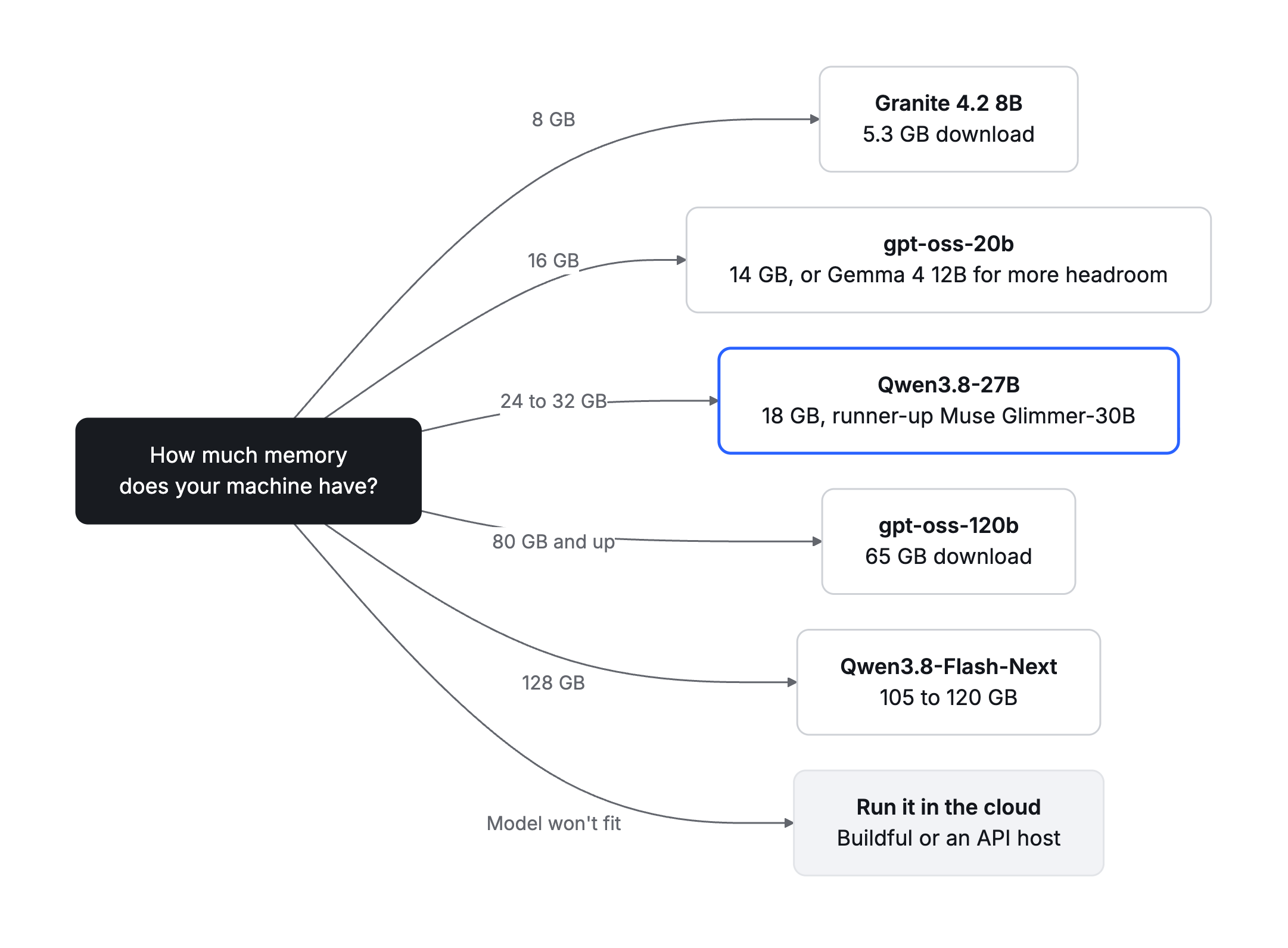
The model to start with at each memory size, based on the picks in this guide.
Which model should you run on 8 to 16 GB?
On a 16 GB machine, gpt-oss-20b is the pick. OpenAI's model card says it runs "within 16GB of memory", and the Ollama download (gpt-oss:20b) is 14 GB. It calls tools, holds 128K tokens, and is licensed under Apache 2.0.
The reason to pick it is the coding score. OpenAI's model card PDF reports 60.7 on SWE-bench Verified at high reasoning effort, which is the best SWE-bench score in this tier by a distance. The 53.2 you'll see on the Hugging Face card comes from the medium-effort run.
The catch is memory. On a 16 GB Mac, 14 GB of weights leaves only 2 GB for macOS and the context cache, so either close everything else or treat it as a 24 GB model.
Gemma 4 12B is the more comfortable fit for 16 GB. The gemma4:12b tag is 8 GB, which leaves real room for context, and Google's model card lists native function calling and a 256K window under Apache 2.0. Google reports 72.0 on LiveCodeBench v6, but you can't line that up against gpt-oss's SWE-bench number. LiveCodeBench is made of contest-style programming problems, while SWE-bench measures edits to an existing repository.
Granite 4.2 8B is the only model here that fits an 8 GB machine. The granite4.2:8b tag is 5.3 GB with a 128K context, and IBM's card reports 47.67 on SWE-bench Verified for a model it released on 25 August 2026. IBM says it supports tool calling, but Ollama's library page doesn't carry the tools badge, so try it in your agent before you depend on it.
Which model should you run on 24 to 32 GB?
Run Qwen3.8-27B, and keep Muse Glimmer-30B as your second choice. This is the tier where local coding gets good, and both of these Apache 2.0 models come in at the same 18 GB download.
Qwen3.8-27B went public on 14 August 2026. The qwen3.8:27b tag is the q4_K_M build at 18 GB, it calls tools, and the model card gives a native context of 262,144 tokens that can be extended to a million. Qwen reports 73.0 on Terminal-Bench 2.1, 61.7 on SWE-bench Pro, and 90.3 on LiveCodeBench v6. Because it's a dense model, all 27 billion parameters work on every token, and its card lists native image and video understanding, so it can work from screenshots and diagrams as well as text.
Muse Glimmer-30B is Meta's dense 30B model, released in August 2026. Its card says 4-bit weights shrink the language model "to under 20 GB", and the Ollama tag muse-glimmer:30b comes in at 18 GB with tool calling and image input. Meta reports 76.0 on SWE-bench Verified, 51.2 on SWE-bench Pro, and 51.7 on Terminal-Bench 2.1, and the window is 128K.
Start with Qwen3.8-27B. Qwen's model card ran Glimmer through the same Claude Code harness on SWE-bench Pro, and Qwen leads that comparison by 10.5 points while holding twice the context. Its Terminal-Bench 2.1 lead is bigger, at 21.3 points, but the two vendors ran that benchmark through different agent setups, so treat it as a rough signal. Glimmer's 76.0 is the highest SWE-bench Verified score in this article, but Qwen doesn't publish a Verified number to set beside it.
So keep Glimmer around as the second model for the times Qwen stalls on a task. Both licenses let you fine-tune and ship the result, and our fine-tuning guide covers when that beats writing better prompts.
The rest of this tier is for more specific needs:
- Gemma 4 31B and 26B A4B. The
gemma4:31btag is 19 to 20 GB and scores 80.0 on LiveCodeBench v6. Thegemma4:26btag is 16 to 19 GB and scores 77.1, and because it's a mixture-of-experts model with 3.8B of its 25.2B parameters active per token, it generates faster than the dense models here. Both have 256K windows under Apache 2.0. - Granite 4.2 30B. This is a dense model at 18 GB (
granite4.2:30b) with a 128K context under Apache 2.0. IBM reports 57 on SWE-bench Verified, which puts it 19 points behind Glimmer at the same download size. - Nemotron 3.5 Lightning 30B-A3B. This is the one to pick for long context. NVIDIA's card gives up to a million tokens, though NVIDIA itself uses 256K on a single H100. The
nemotron-3.5-lightning:30btag ranges from 19 GB (NVFP4 for Apple silicon) to 25 GB (q4_K_M). It scores 51.56 on SWE-bench Verified and 24.58 on Terminal-Bench 2.1, under the OpenMDW 1.1 license. - Nemotron 3.5 Bolt 74B-A9B. NVIDIA's card says it uses "a native 2-bit quantization to fit in 24GB of memory", but only the experts are 2-bit, and the Ollama tag
nemotron-3.5-bolt:74b-a9bis 25 GB. Plan on a 32 GB machine for this one, since a 24 GB card won't hold it. It scores 50.98 on Terminal-Bench 2.1 and has a 256K window, under OpenMDW 1.1.
What do 80 GB to 128 GB machines get you?
They get you less than you'd expect, at least on coding benchmarks, because the extra memory mostly buys speed and context.
gpt-oss-120b is a 65 GB download (gpt-oss:120b), and OpenAI's card says it runs "on a single 80GB GPU (like NVIDIA H100 or AMD MI300X)". That rules out a 64 GB Mac, which can't hold 65 GB of weights, so think 96 GB or 128 GB. It scores 62.4 on SWE-bench Verified at high effort and 52.6 at medium, with a 128K context, under Apache 2.0.
Nemotron 3.5 Super-VL 120B-A12B is 90 GB at q4_K_M and 80 GB in the Apple silicon build, and on Ollama it goes by nemotron-3.5-super instead of super-vl. NVIDIA's card reports 71.10 on SWE-bench Verified, 51.78 on SWE-bench Pro, and 60.67 on Terminal-Bench 2.1, with a million-token window, under OpenMDW 1.1. That puts it 8.7 points above gpt-oss-120b on Verified, for 25 GB more memory.
Qwen3.8-Flash-Next needs most of a 128 GB machine, at 105 GB in the MLX build and 120 GB at q4_K_M. There's no latest tag, so pull qwen3.8-flash-next:125b-a6b-q4_K_M by name. Its card describes a 125B language model with 6B active parameters and reports 62.5 on SWE-bench Pro and 91.9 on LiveCodeBench v6. Unlike the Apache 2.0 models above, it ships under the Qwen Community License 1.0.
The telling comparison is with its small sibling. Flash-Next scores 0.8 points above Qwen3.8-27B on SWE-bench Pro, for 6.7 times the download. What the big machine buys you is speed, since only 6B parameters are active per token against 27B, along with room for long context and the option to keep two models loaded. The coding itself barely improves.
How do all thirteen compare?
The table puts all thirteen side by side, sorted by the memory each one needs, from the 5.3 GB Granite 4.2 8B up to the 120 GB Qwen3.8-Flash-Next.
| Model | Memory tier | Ollama tag | Download | Tools | Context | License | Vendor coding score |
| Granite 4.2 8B | 8 GB | granite4.2:8b | 5.3 GB | IBM says yes | 128K | Apache 2.0 | SWE-bench Verified 47.67 |
| Gemma 4 12B | 16 GB | gemma4:12b | 8 GB | Yes | 256K | Apache 2.0 | LiveCodeBench v6 72.0 |
| gpt-oss-20b | 16 GB | gpt-oss:20b | 14 GB | Yes | 128K | Apache 2.0 | SWE-bench Verified 60.7 (high) |
| Qwen3.8-27B | 24 to 32 GB | qwen3.8:27b | 18 GB | Yes | 256K | Apache 2.0 | SWE-bench Pro 61.7, Terminal-Bench 2.1 73.0 |
| Muse Glimmer-30B | 24 to 32 GB | muse-glimmer:30b | 18 GB | Yes | 128K | Apache 2.0 | SWE-bench Verified 76.0, SWE-bench Pro 51.2, Terminal-Bench 2.1 51.7 |
| Gemma 4 26B A4B | 24 to 32 GB | gemma4:26b | 16 to 19 GB | Yes | 256K | Apache 2.0 | LiveCodeBench v6 77.1 |
| Gemma 4 31B | 24 to 32 GB | gemma4:31b | 19 to 20 GB | Yes | 256K | Apache 2.0 | LiveCodeBench v6 80.0 |
| Granite 4.2 30B | 24 to 32 GB | granite4.2:30b | 18 GB | IBM says yes | 128K | Apache 2.0 | SWE-bench Verified 57 |
| Nemotron 3.5 Lightning 30B-A3B | 24 to 32 GB | nemotron-3.5-lightning:30b | 19 to 25 GB | Yes | 1M | OpenMDW 1.1 | SWE-bench Verified 51.56 |
| Nemotron 3.5 Bolt 74B-A9B | 32 GB | nemotron-3.5-bolt:74b-a9b | 25 GB | Yes | 256K | OpenMDW 1.1 | Terminal-Bench 2.1 50.98 |
| gpt-oss-120b | 80 GB and up | gpt-oss:120b | 65 GB | Yes | 128K | Apache 2.0 | SWE-bench Verified 62.4 (high) |
| Nemotron 3.5 Super-VL 120B-A12B | 96 to 128 GB | nemotron-3.5-super:120b | 80 to 90 GB | Yes | 1M | OpenMDW 1.1 | SWE-bench Verified 71.10 |
| Qwen3.8-Flash-Next | 128 GB | qwen3.8-flash-next:125b-a6b-q4_K_M | 120 GB | Yes | 256K | Qwen Community 1.0 | SWE-bench Pro 62.5 |
Every score is the vendor's own, read from the model cards and Ollama's library pages on 27 and 28 October 2026. Vendors choose their own harness, reasoning effort, and benchmark version. OpenAI's numbers are at high effort, for example, and Qwen and Meta run Terminal-Bench 2.1 through different Terminus agent setups.
So only compare scores on the same benchmark, and treat a gap of a point or two as a tie. Before you settle on a model, run it against your own repository.
How do you point Claude Code or OpenCode at a local model?
You point both of them at Ollama's local server. Both agents work through tool calls, so pick a model with tool calling and give it at least 64K of context.
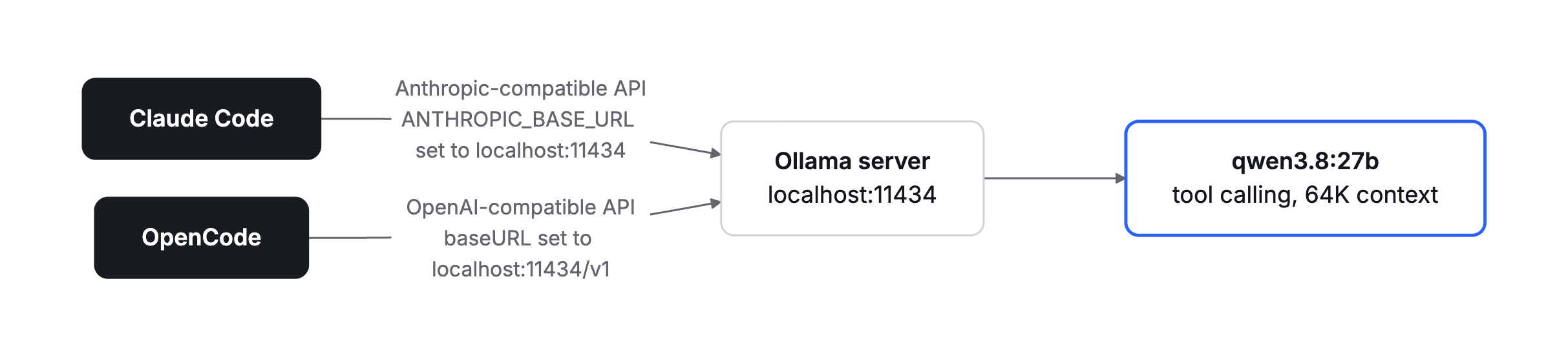
Both agents talk to the same Ollama server, each through its own compatible API.
For Claude Code, Ollama's integration page has a one-line setup. ollama launch claude configures Claude Code for Ollama, and --model names the model you want:
ollama launch claude --model qwen3.8:27b
If you'd rather wire it up by hand, point Claude Code at Ollama's Anthropic-compatible endpoint:
export ANTHROPIC_AUTH_TOKEN=ollama
export ANTHROPIC_API_KEY=""
export ANTHROPIC_BASE_URL=http://localhost:11434
claude --model qwen3.8:27b
For OpenCode, add Ollama as an OpenAI-compatible provider in opencode.json, the way its providers docs show:
{
  "$schema": "https://opencode.ai/config.json",
  "provider": {
    "ollama": {
      "npm": "@ai-sdk/openai-compatible",
      "name": "Ollama (local)",
      "options": {
        "baseURL": "http://localhost:11434/v1"
      },
      "models": {
        "qwen3.8:27b": {
          "name": "Qwen3.8 27B"
        }
      }
    }
  }
}
OpenCode's docs say to raise num_ctx if tool calls fail, and they suggest starting at 16K to 32K. Go straight to Ollama's 64K instead. Whenever tool calls break on a local model, a short context is the first thing to check.
Which coding models are too big to run locally?
The strongest open-weight coding models don't fit on any desktop. Kimi K3 has 2.8 trillion parameters, and its weight files add up to about 1.56 TB. GLM-5.3 has 753 billion parameters and takes about 756 GB on Hugging Face. Meta's Muse Spark Open has 816 billion parameters, and its card asks for at least 700 GB of GPU memory at NVFP4, so a 128 GB workstation holds less than a fifth of what it needs.
If what you want is the code written, Buildful runs these models for you. It's an AI coding agent: you describe a change, and it builds it, tests it in a real browser, and opens a pull request on your GitHub repo. It runs open-weight models in the cloud, so there's no GPU to buy and nothing running on your laptop.
Pro is $10 a month for 1,000 Smart Mode tasks, where Buildful picks the open-weight model for each task, and you can try three tasks free with no card. Picking a model yourself, such as Kimi K3 or GLM-5.3, draws on prepaid credit, and the $30 Buildful Pass adds $80 of monthly usage on Kimi K3, DeepSeek V4.1 Flash, GLM-5.3 Flash, and MiniMax M3.1 Flash. The trade-off is the same one that sent you local in the first place, because Buildful works on your code in its cloud sandbox instead of on your machine.
If you need an API to build on instead, the labs and hosts such as Together and Fireworks serve these models per token. Our guide to running open-weight models free or cheap compares the hosts and their free tiers, and our ranking of the best open-weight LLMs for coding covers the models too big for this list.
FAQ
What LLM can I run locally?
You can run the strongest model whose Ollama download fits in your memory once you set aside a few gigabytes for the operating system and the context cache. That works out to Granite 4.2 8B on 8 GB, gpt-oss-20b or Gemma 4 12B on 16 GB, Qwen3.8-27B or Muse Glimmer-30B on 24 to 32 GB, and gpt-oss-120b, Nemotron 3.5 Super-VL, or Qwen3.8-Flash-Next from 80 GB up.
What's the best local LLM for coding?
Qwen3.8-27B is the best local LLM for coding in this guide. It's an 18 GB download under Apache 2.0, it calls tools, and it holds 262,144 tokens natively. Its vendor-reported 61.7 on SWE-bench Pro is within a point of Qwen3.8-Flash-Next, a model that needs 120 GB. Muse Glimmer-30B is a close second, with the highest SWE-bench Verified score of any model here at 76.0.
How much RAM do I need for a local LLM?
You need 16 GB to run a useful coding model, and 32 GB gets you the best value. On 16 GB you can run gpt-oss-20b at 14 GB or Gemma 4 12B at 8 GB. On 32 GB you can run Qwen3.8-27B or Muse Glimmer-30B with room for a 64K context. Past that, extra memory buys speed and context more than coding ability.
Can a local model drive Claude Code?
Yes, Claude Code can run against a local model through Ollama. Run ollama launch claude --model qwen3.8:27b, or set ANTHROPIC_BASE_URL=http://localhost:11434, ANTHROPIC_AUTH_TOKEN=ollama, and an empty ANTHROPIC_API_KEY, then start claude with a local model. Pick a model with tool calling and raise Ollama's context to 64K, because on a machine with under 24 GiB of VRAM the default is 4K.
Can I use Kimi K3 or GLM-5.3 without the hardware?
Yes. Buildful runs both in the cloud as a coding agent, which the section on models too big to run locally explains, including how picking a model is billed. If you'd rather have raw API access, Moonshot and Z.ai sell their own APIs, and Together and Fireworks serve both per token.
About the author
Software Engineer @Bug0, contributing writer to The Foreword by Hashnode


