
Claude Code usage limits: how they work, how to check yours, and what to do when you hit one
The 5-hour and weekly limits on Pro, Max and Team, the commands that show where your usage went, and five ways to keep working when you hit the wall.

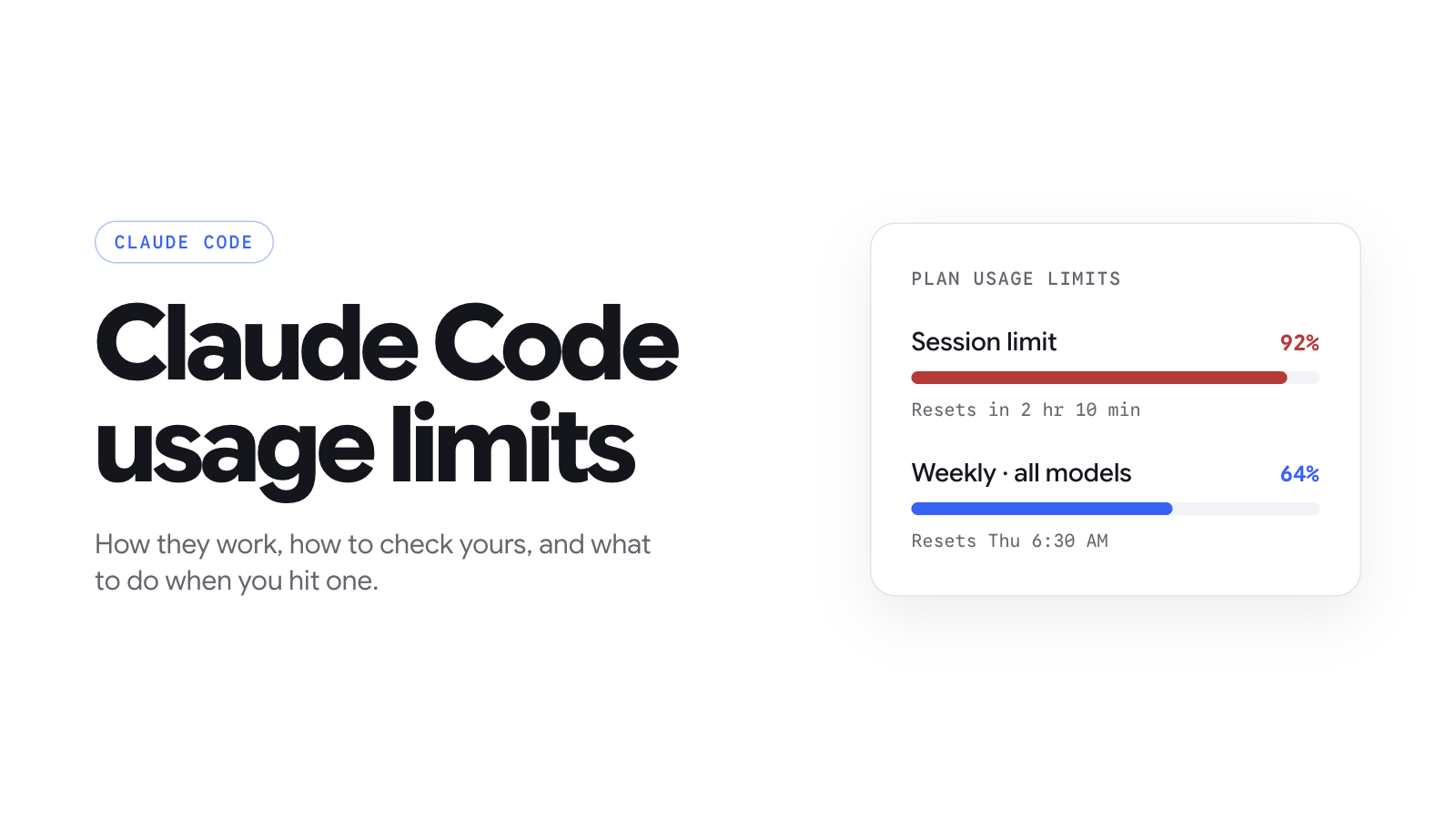
tldr: Claude Code shares one usage pool with claude.ai. Every paid plan has a 5-hour session limit and a weekly limit, and Anthropic doesn't publish either as a number of prompts. Run /usage to see where yours went. At the limit you can wait for the reset, buy usage credits, switch to an API key, move up a plan, or hand your backlog to a cloud coding agent on a flat price, like Buildful (which we build), at $10 a month.
If you landed here mid-task with a limit message on screen, skip to what happens when you hit the Claude Code usage limit.
How do Claude Code usage limits work?
Two limits apply at once: a rolling 5-hour session limit and a weekly limit, and both are shared with your claude.ai chats.
Claude Code doesn't have a budget of its own. Every paid Claude plan has one pool, and Anthropic says the limits "are shared across Claude and Claude Code". A long chat in the browser in the morning leaves less for the terminal in the afternoon. The same goes for the VS Code, Cursor and JetBrains extensions, for Claude Code sessions in the cloud, and for subagents. Running several tasks in parallel drains the pool faster.
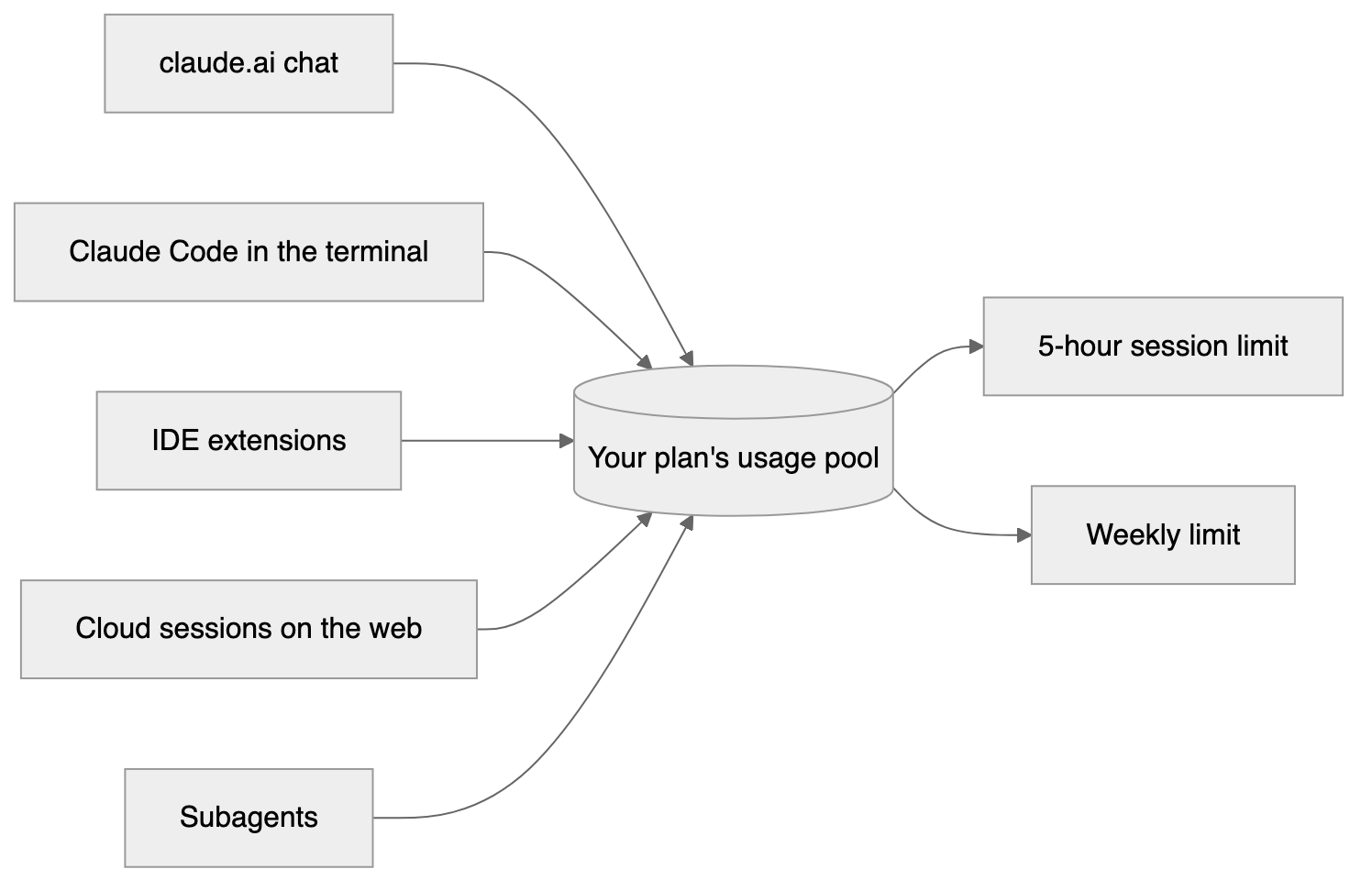
Everything you do with Claude on a paid plan draws from the same two limits.
The session limit runs on a rolling five-hour window. The weekly limit resets at a fixed time that Anthropic assigns to your account, so it isn't seven days from your first message. /usage shows yours.
What uses the pool up is how much work each request does, not how many requests you send. Anthropic lists the length of the conversation, attachments, tools, the model, the effort level and multi-step tasks. Prompt caches also expire when you go idle, so the first message after a coffee break costs more than the one before it.
That's why you'll find no prompt counts or token limits here. Anthropic's own pricing page says there's "no fixed message count". Pages that quote "10 to 40 prompts on Pro" are repeating numbers Anthropic never published, from support pages that no longer exist.
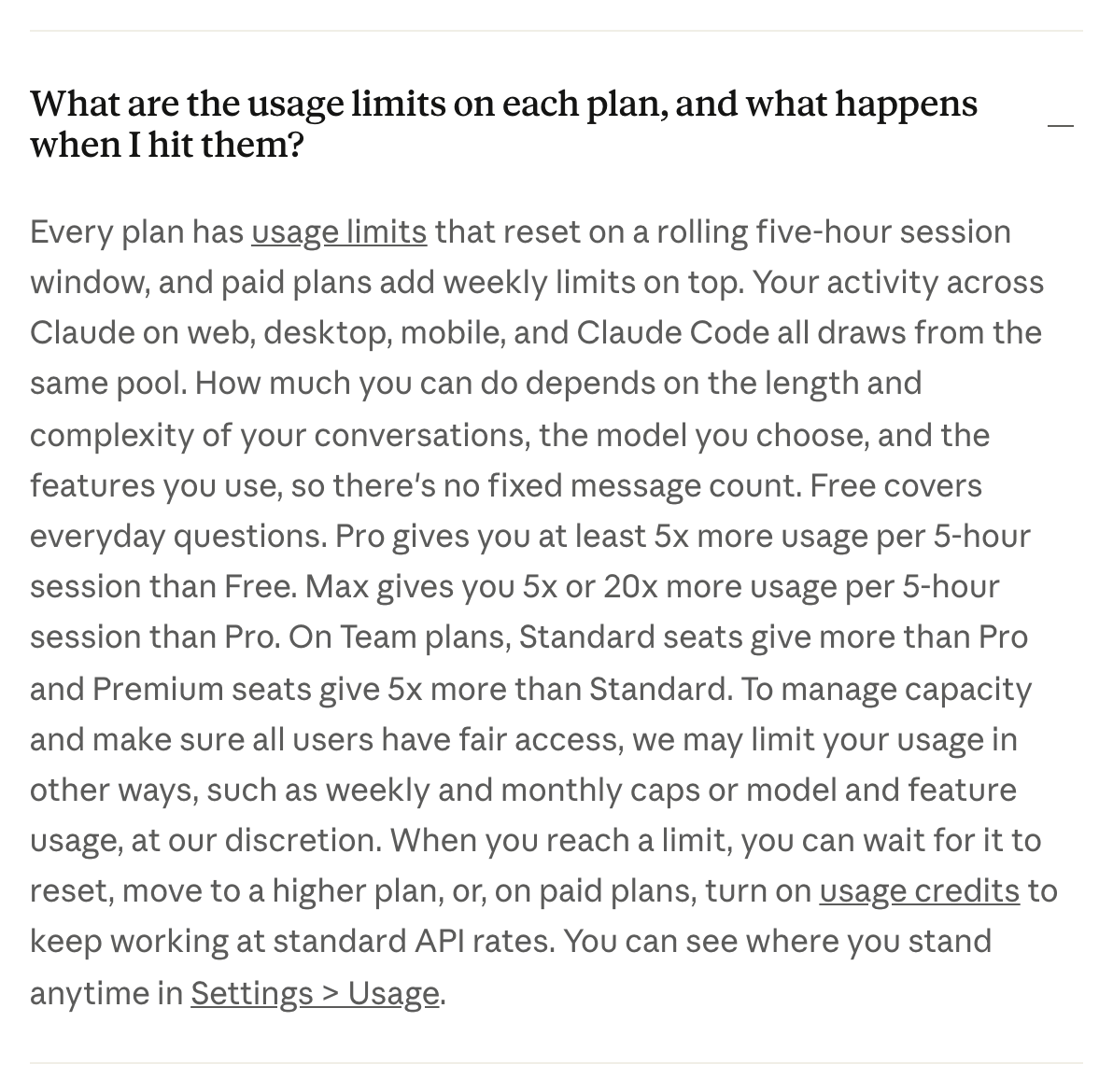
Anthropic's own answer on its pricing page.
What are the Claude Code usage limits on each plan?
Max 5x and Max 20x give you five and twenty times Pro's usage per 5-hour session. Anthropic doesn't publish the weekly multiples.
| Plan | Price a month | Usage per 5-hour session | Fable models | Usage credits |
| Pro | $20, or $17 billed yearly | The baseline, at least 5x Free | Usage credits only | Yes |
| Max 5x | $100 | 5x Pro | Up to 50% of your weekly limit | Yes |
| Max 20x | $200 | 20x Pro | Up to 50% of your weekly limit | Yes |
| Team Standard | $25 a seat, or $20 billed yearly | More than Pro | Usage credits only | Yes |
| Team Premium | $125 a seat, or $100 billed yearly | 5x Team Standard | Up to 50% of your weekly limit | Yes |
Sources: Claude pricing, the Max plan, Fable on your plan. Enterprise is $20 a seat plus usage at API rates, and its usage-based version has no set limits.
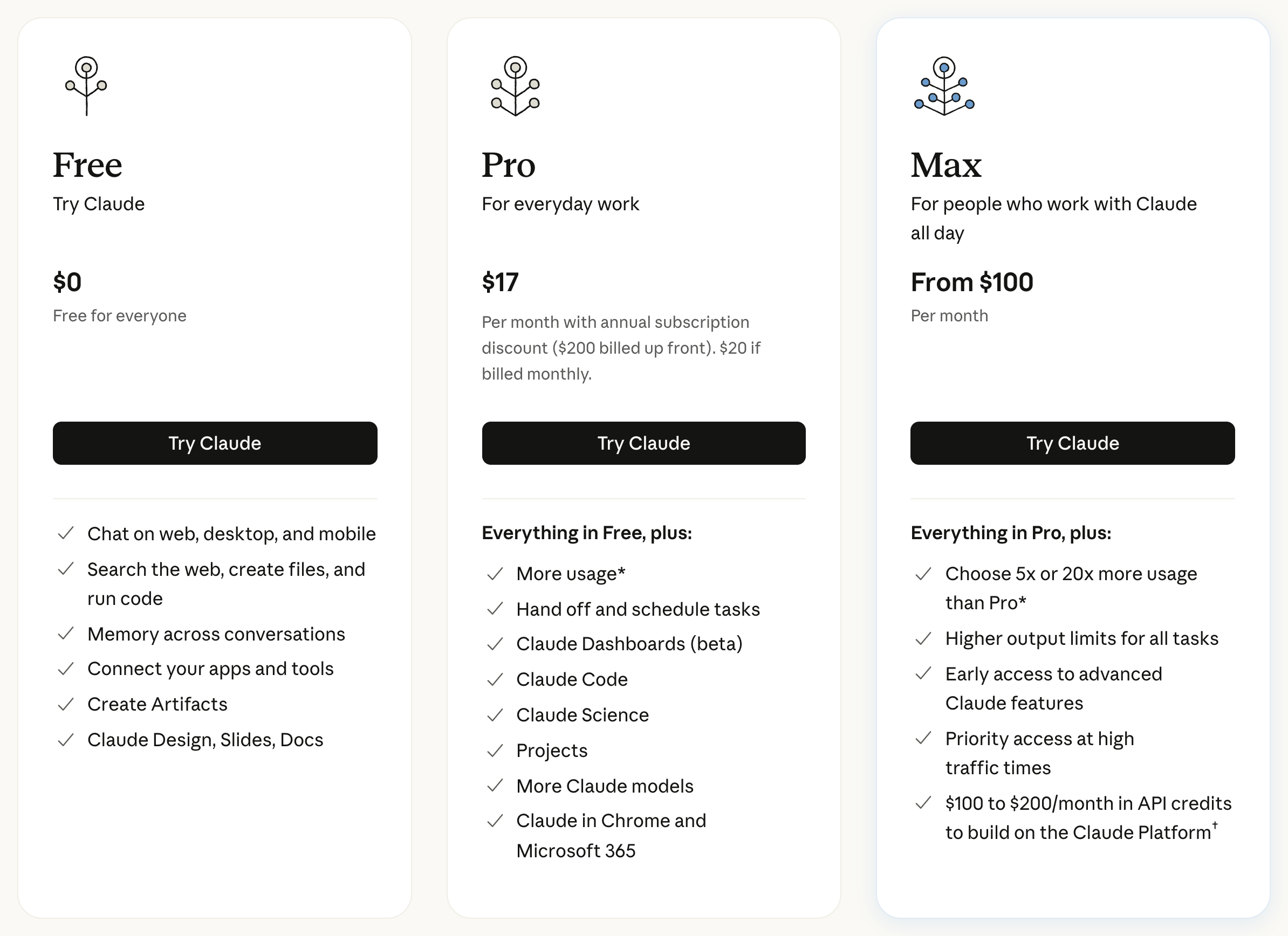
Two details on that table catch people out.
First, Fable. On Max and Team Premium, Fable can use up to half of your weekly limit, so a week of Fable can leave you with half a week for everything else. On Pro and Team Standard, Fable runs only on usage credits.
Second, the API credits. Max includes $100 or $200 a month in API credits, and Team includes some per seat. Those credits don't cover Claude Code or extra usage. They're for building on the Claude Platform.
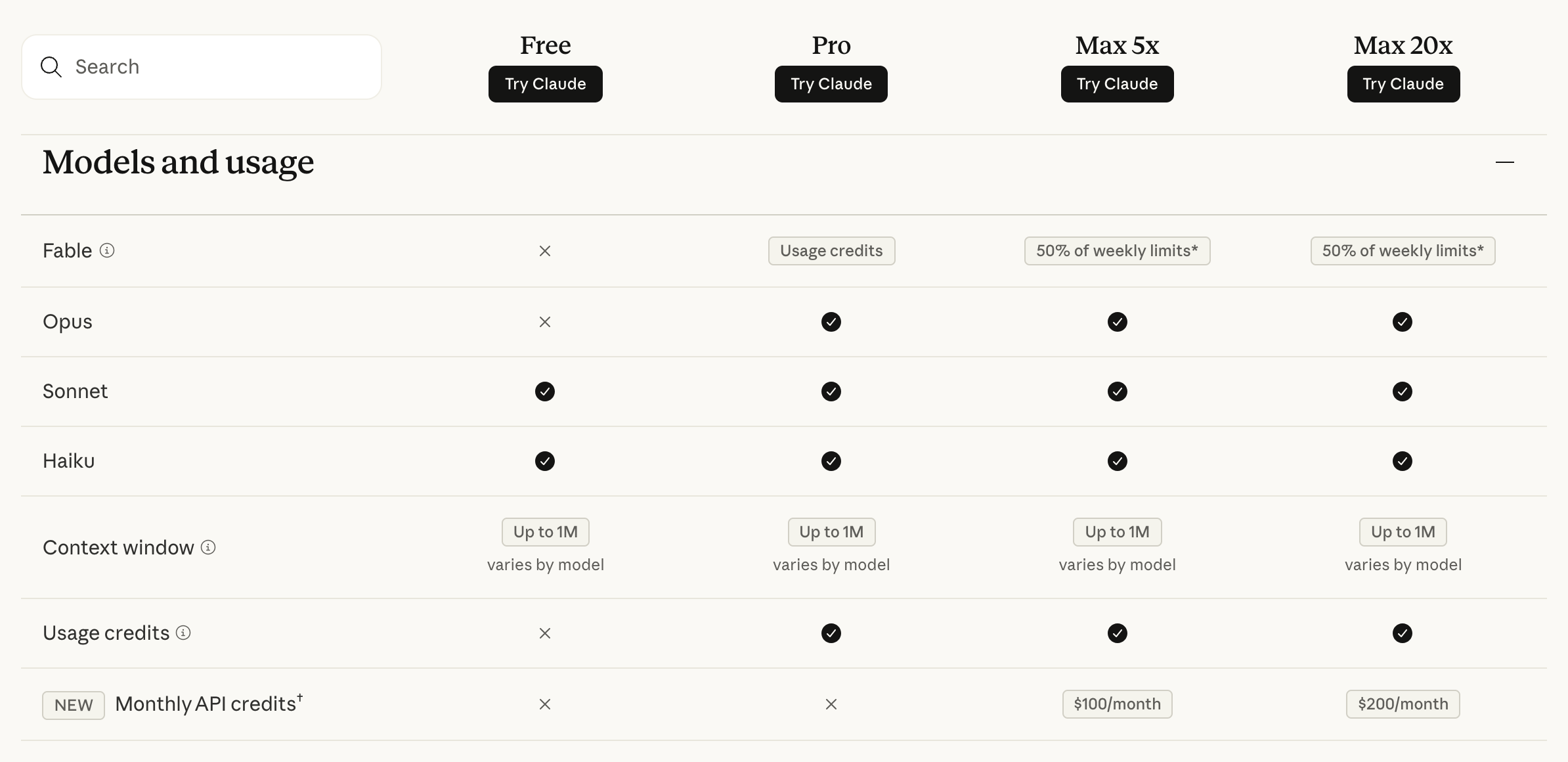
Fable's cap and the API credits, from the plan comparison on claude.com/pricing.
If you're deciding between the Max tiers, the session multiples make the maths simple.
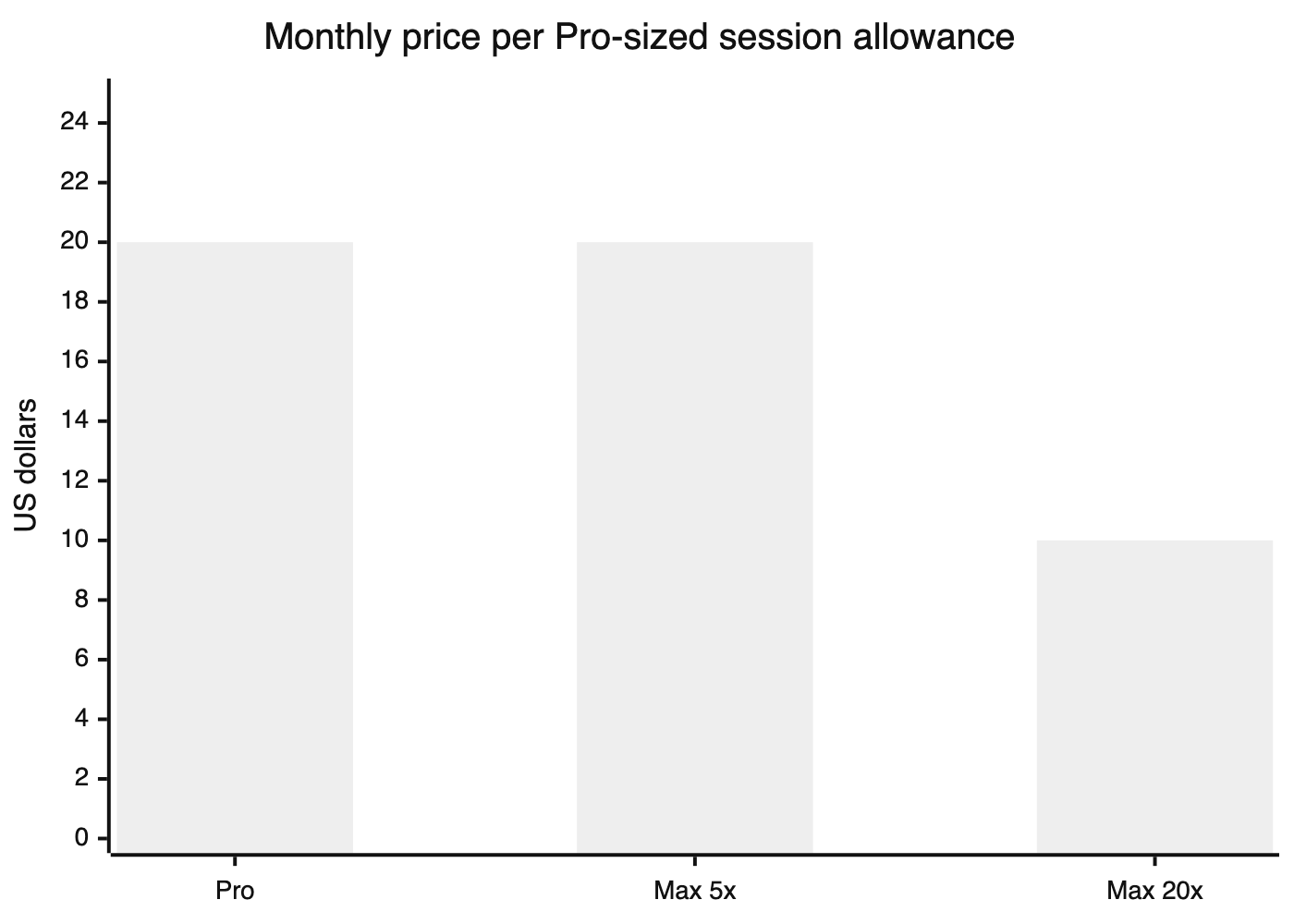
Our arithmetic: each plan's price divided by its session multiple. Max 5x costs the same per unit as Pro, and Max 20x halves it. Weekly multiples aren't published, so this compares session limits only.
How do you check your Claude Code usage?
/usage shows how much of each limit you've used and what used it.
Run it inside Claude Code:
/usage
It shows a bar for your session limit, one for the weekly limit across all models, and a separate weekly bar for Fable, each with its reset time. Below that come the current session's numbers: the model split, the cache hit rate, and the tokens by type. Then a "What's contributing" list shows which skills, subagents and MCP servers used the most, with a tip on what to change. Press f to apply the fixes it suggests. /cost and /stats open the same view.
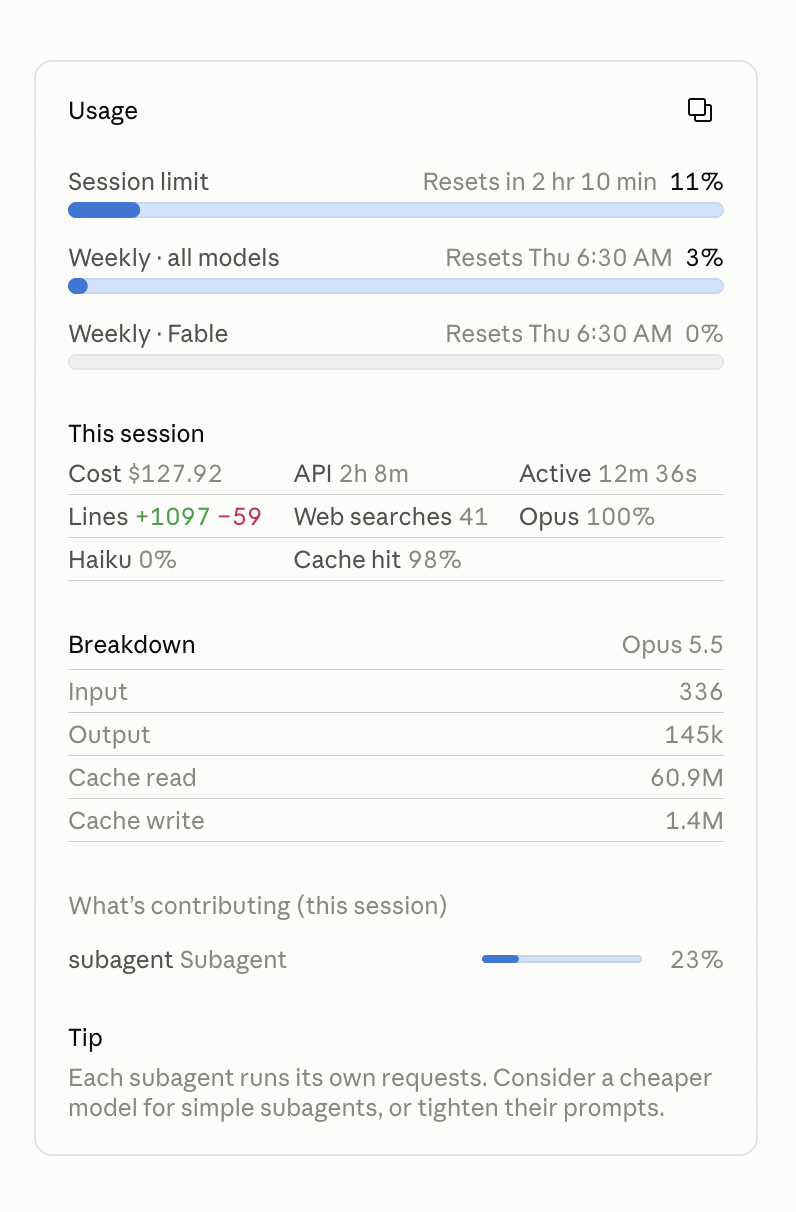
My /usage panel partway through a long session. Subagents were behind almost a quarter of it, and the panel says so.
Three more commands help:
/statusshows which sign-in is active, your plan or an API key. Check it whenever a bill surprises you./contextshows what's filling the context window right now.- On claude.ai, Settings > Usage shows the same bars outside the terminal.
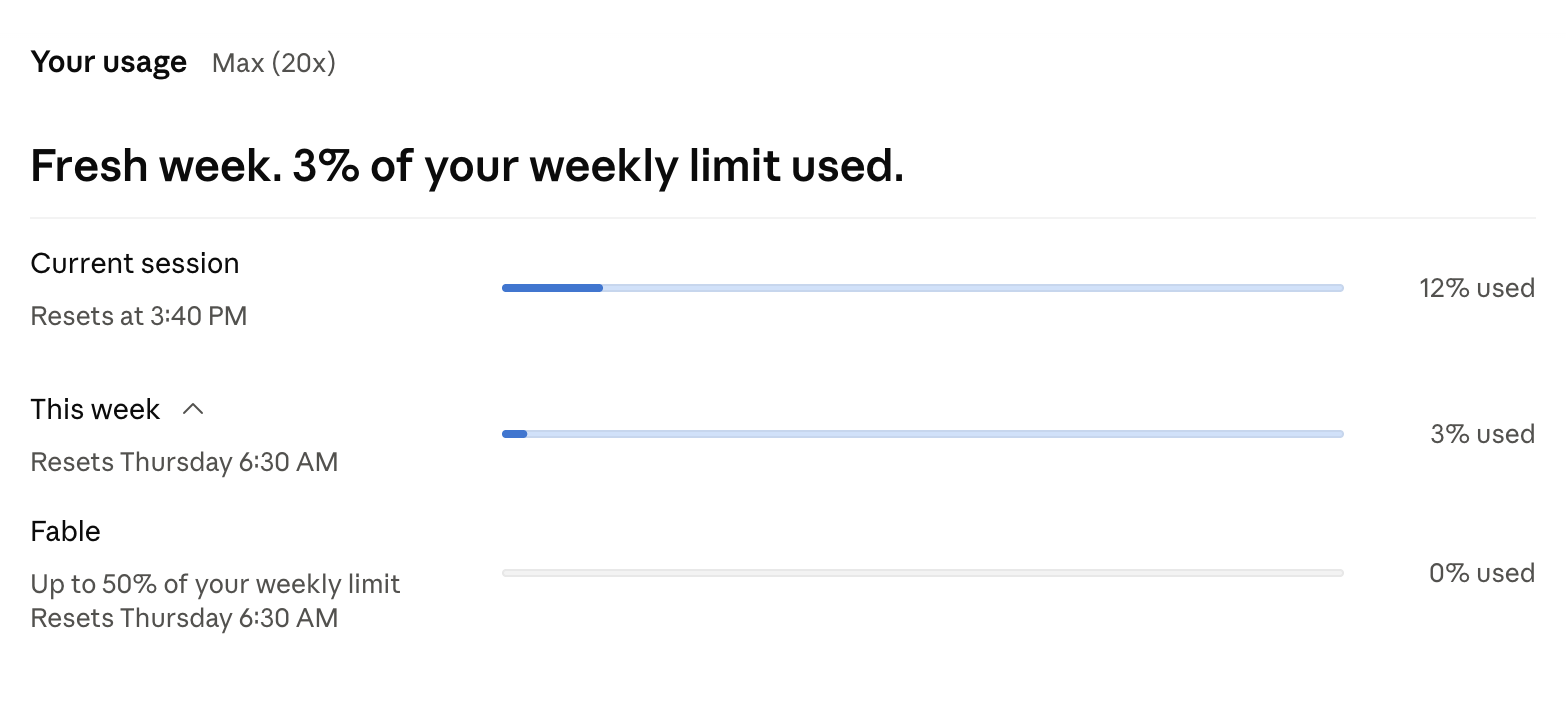
Settings > Usage on my Max 20x plan. The weekly limit resets at a fixed time, Thursday at 6:30 AM for my account, and Fable's cap shows as its own bar.
If you want a Claude Code usage monitor that stays on screen, you have two options. In the Claude desktop app, hover over the ring next to the model picker and it shows your session and weekly limits with their reset times.
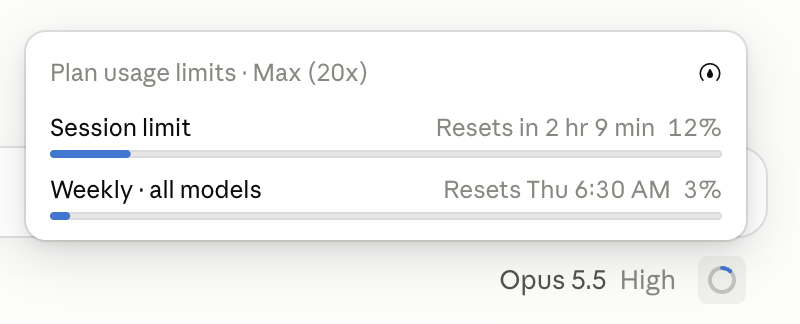
In the terminal, put them in your status line. On Pro and Max, Claude Code passes rate_limits.five_hour and rate_limits.seven_day to your status line script, each with used_percentage and resets_at:
#!/bin/bash
# ~/.claude/statusline.sh: prints "5h 42% · week 67%"
jq -r 'if .rate_limits then "5h \(.rate_limits.five_hour.used_percentage | floor)% · week \(.rate_limits.seven_day.used_percentage | floor)%" else empty end'
Make it executable, then point Claude Code at it in ~/.claude/settings.json:
{
  "statusLine": { "type": "command", "command": "~/.claude/statusline.sh" }
}
When you're signed in with an API key, the rate_limits fields aren't there, and the script prints nothing.
What happens when you hit the Claude Code usage limit?
Claude Code tells you which limit you hit and when it resets.
You get a warning first, then the limit itself. The messages look like this:
You've used 85% of your session limit
You've hit your session limit · resets 3:45pm
You've hit your weekly limit · resets Mon 12:00am
You've hit your Opus limit
Two features soften the stop. When the limit arrives mid-task, "Usage limit reached · wrapping up" lets the current step finish, once per week on Pro and at each 5-hour limit on Max. Anthropic's support page describes it as rolling out. And from version 2.1.234, Claude Code can wait for the reset and pick the task back up on its own ("Continuing automatically at 3:45pm · esc to cancel"), at most twice. Turn it on with /rate-limit-options.
Switching models helps less than people expect. If you hit your Opus limit, /model moves you to Sonnet and you keep going. If you hit your session or weekly limit, every model is out until the reset. The fallbackModel setting doesn't help either: it only kicks in when a model is overloaded or unavailable, never on a rate limit.
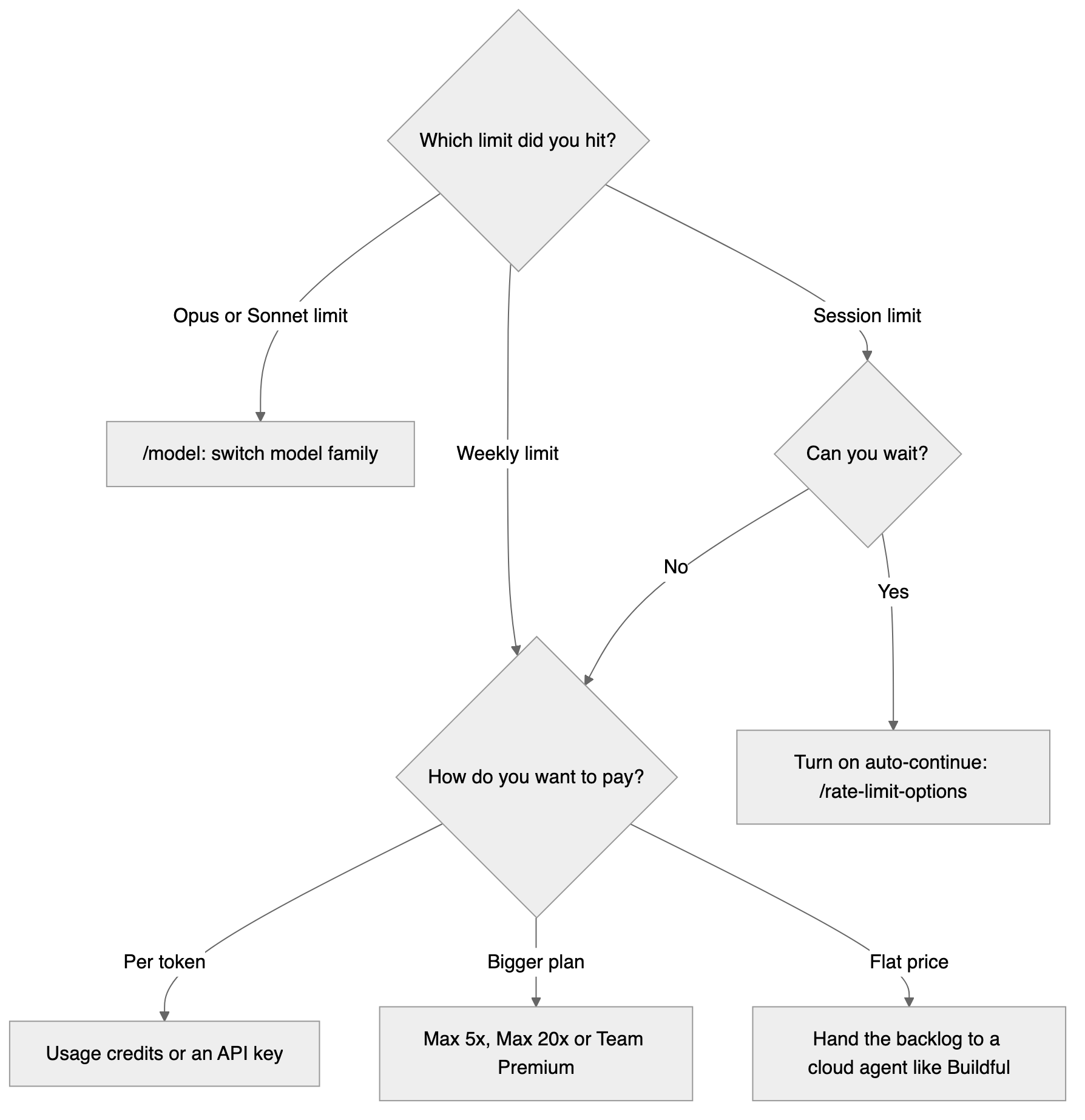
How do you keep working when you hit the limit?
You can wait, pay per token, pay for a bigger plan, or move some of the work elsewhere. Here are the five options.
- Wait for the reset, with auto-continue on, so the task resumes without you.
- Buy usage credits. They're prepaid and billed at standard API rates, with a monthly cap or auto-reload. When they kick in, the label changes to "Now using credits".
/usage-creditsopens billing on Pro and Max, or sends a request to your admin on Team. - Switch to an API key. Set
ANTHROPIC_API_KEYfrom a Console account, check/statusto confirm it's active, andunset ANTHROPIC_API_KEYto go back to your plan. Once a key is set and approved, every session bills to the API until you remove it. Cloud sessions always use your subscription. Per-token rates for every Claude model are in our LLM API pricing comparison. - Move up a plan, to Max 5x, Max 20x or Team Premium.
- Move the work that doesn't need Opus. A lot of a backlog is routine: a settings page, a bug with a clear repro, a dependency bump. Those tasks can run somewhere metered differently, so your Claude limits go to the work that needs them. The Claude Code alternatives below cover that.
Before you switch to an API key, look at what the API costs at full use. Anthropic's own costs page puts the average at about $13 per developer per active day, or $150 to $250 a month, across enterprise deployments.
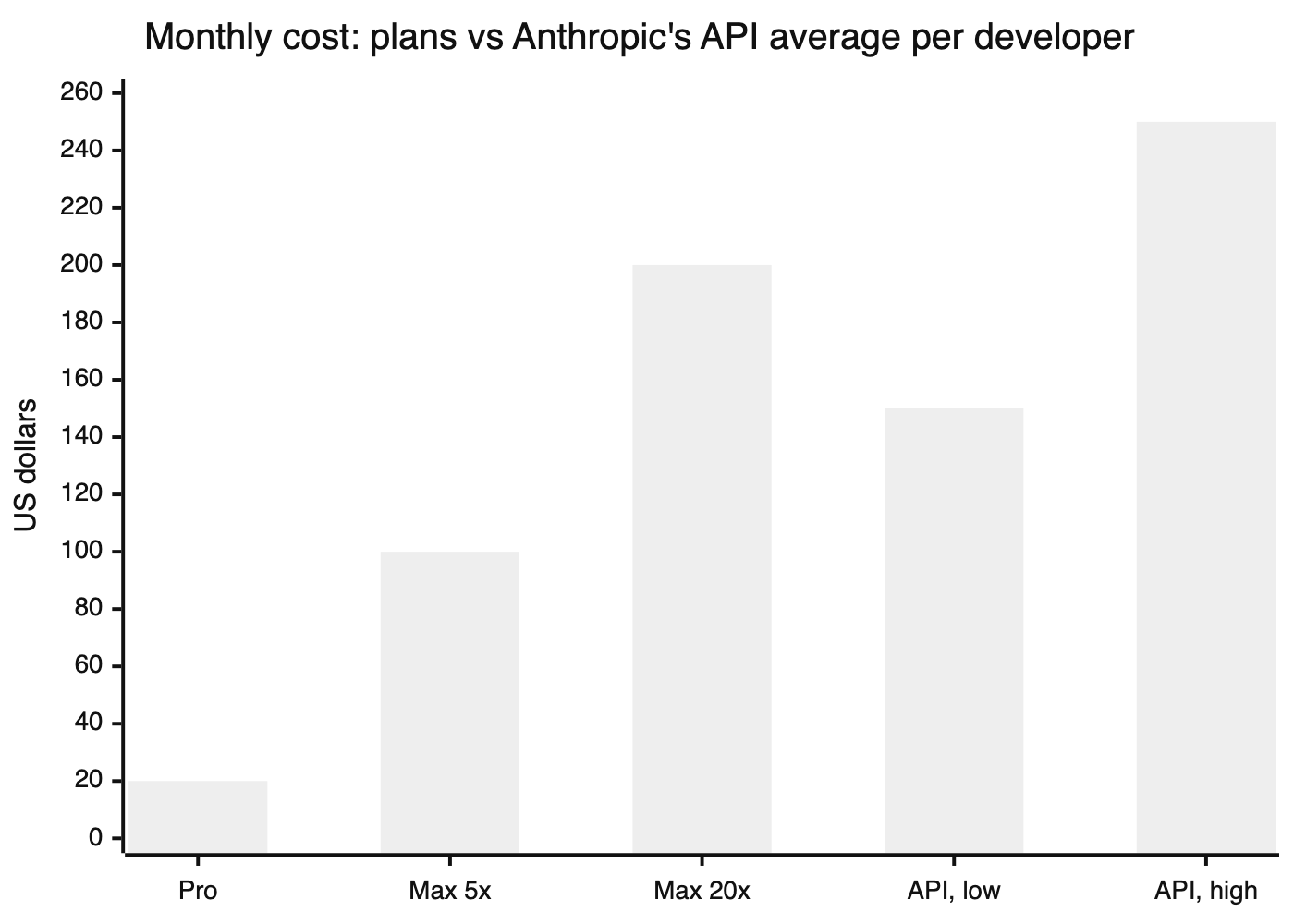
The API numbers are Anthropic's enterprise averages, not a cap. Heavy users pay more.
How do you reduce token usage in Claude Code?
Most of your limit goes to context you didn't need.
From Anthropic's costs guide, the habits that save the most:
- Run
/clearbetween unrelated tasks, and/compactwith instructions when a long task needs its history trimmed. - Match the model to the job, and use a small model like Haiku for subagents.
- Keep
CLAUDE.mdunder 200 lines and move long workflows into skills, which load only when needed. - Prefer command-line tools to MCP servers where both work, since MCP tool definitions sit in your context.
- Use hooks to filter noisy command output before it reaches the model.
- Lower the effort level for routine work, and use plan mode before big changes. Effort also changes what a request costs, as our breakdown of Opus effort levels shows.
- Write specific prompts. "Fix the date bug in
invoice.ts" costs less than "something's wrong with invoices".
Be careful with agent teams. Anthropic says they use about 7x the tokens of a single session.
What are the Claude Code alternatives when you keep hitting the limit?
If the limit is the problem, the fix is often a tool that meters differently: by the task, by the request, or by your own API key.
Buildful
Buildful, which we build, is a cloud coding agent that runs each task on the right open-weight model, tests UI changes in a real browser, and opens a pull request on your GitHub repo, for $10 a month, flat.
Buildful fits the limits problem because it isn't metered by the token, and it doesn't draw from your Claude plan. On Buildful's Pro plan, a task counts once, however many model calls it makes, and follow-ups on a task don't count as new tasks. Pro includes 1,000 tasks a month, about a cent a task. Buildful has a limit too, but it's a number you can see.
You hand Buildful a feature or a bug fix, close the tab, and come back to a pull request. Nothing runs on your laptop. Buildful runs your project's checks, and when a change touches the UI, it tests it in a real browser and records the test.
When a task does need Claude, Buildful's Pro and Team plans let you pick Claude Opus 5.5 yourself, paid from prepaid credit or your own Anthropic key. GPT and other models are in the same list.
Buildful suits a backlog of features and bug fixes you'd rather review as tested pull requests than steer step by step. How Buildful compares with Claude Code goes into more detail, and Buildful pricing has the plans.
Here's a real one from our own repo. Sandeep asked Buildful, in two plain sentences, to add a paginated tasks tab to Buildful's admin panel, showing who ran each task and for which team. It ran on Smart Mode and finished in 10 minutes.
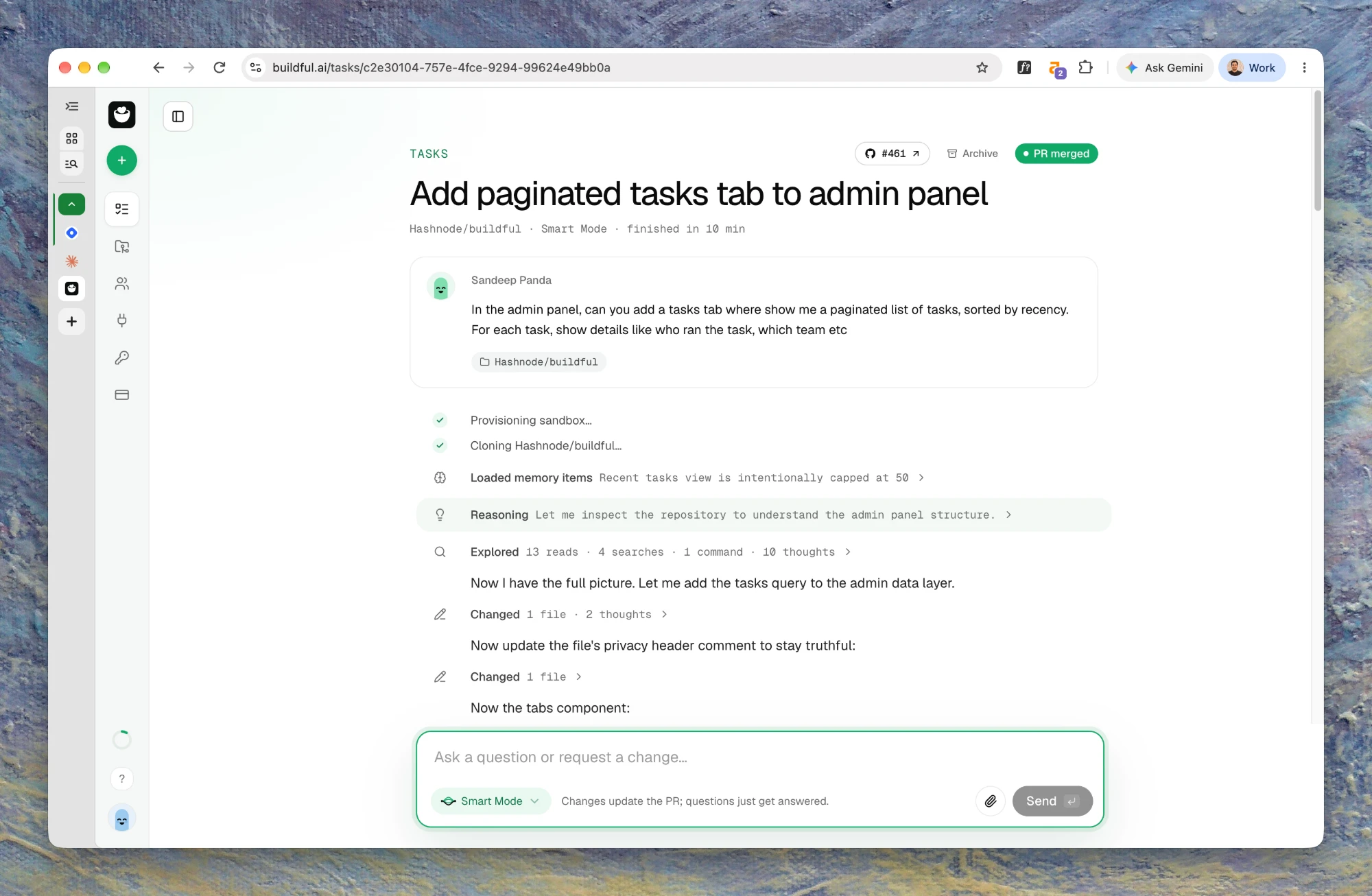
The pull request it wrote explains every change, and its self-review caught a real bug before anyone looked: tasks started from Slack would have been credited to the person who installed Slack, not the person who asked. Buildful fixed that before opening the pull request.
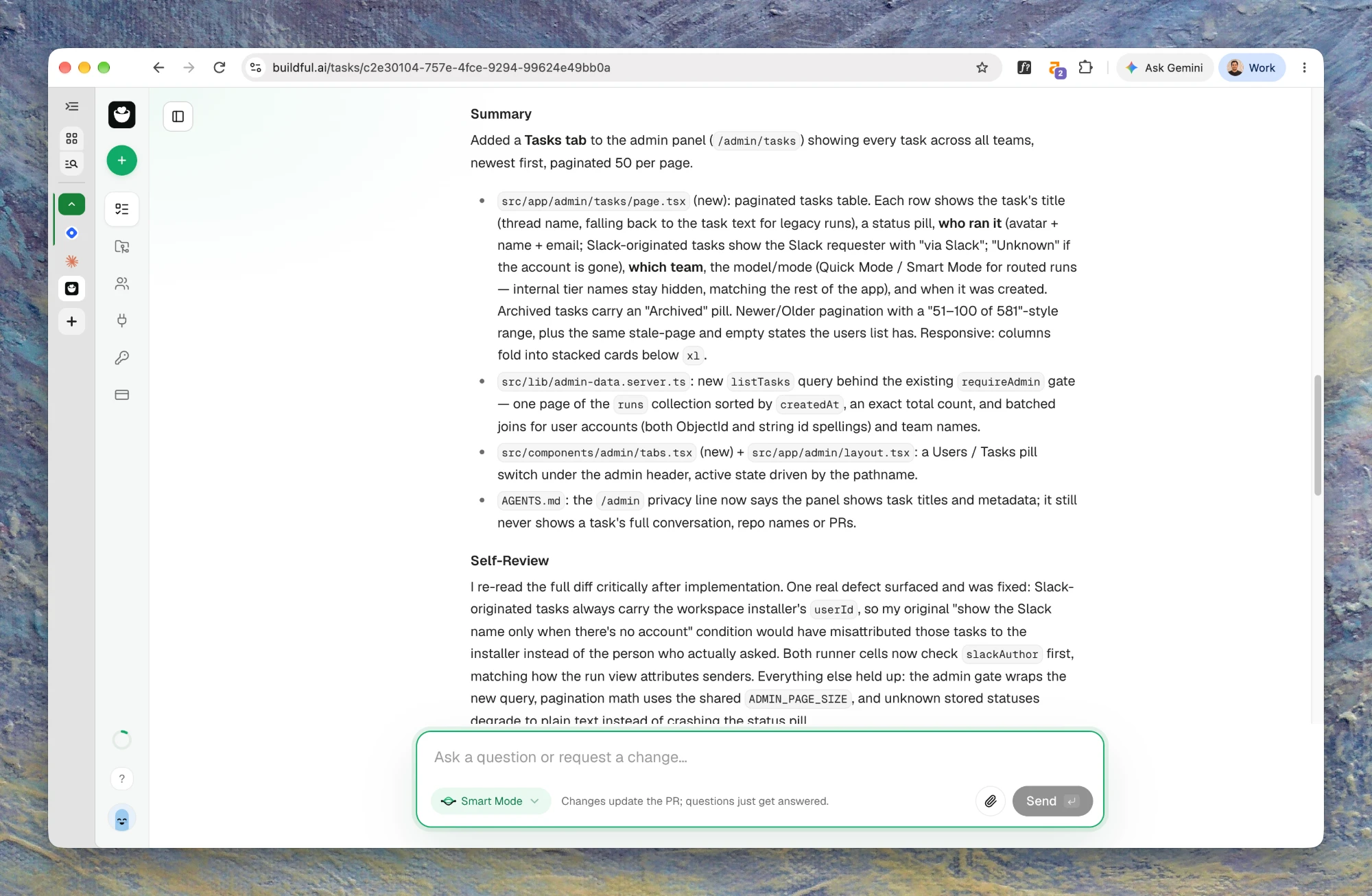
A Buildful task on our own repo: two sentences in, a reviewed and merged pull request out.
OpenCode
OpenCode is an open-source coding agent for the terminal that works the way Claude Code does, with the model of your choice. Bring an API key from Anthropic, OpenAI or another provider, or subscribe to OpenCode Go: $10 a month (or $40 for Go Plus) for a curated set of coding models, including Kimi K3, DeepSeek V4.1 Flash, GPT-6 Luna and Claude Haiku 5.5, which you can also use from other agents. Go has limits of its own, per 5 hours and per month, which vary by model. If you like how Claude Code works and only want a different model behind it, start here.
Codex
Codex is OpenAI's coding agent, included with ChatGPT plans. ChatGPT Plus at $20 a month gets the full Codex, in the CLI, the IDE extension, the cloud and on iOS. Go at $8 covers light use. Plus has its own 5-hour limits, with weekly limits on top, and ChatGPT's pricing page says Pro, from $100 a month, has no 5-hour limit. Like Claude, you can buy credits when you run out, so if you already pay for ChatGPT, you may already have a second pool. We compared the two in Codex vs Claude Code.
Cursor
Cursor is an AI code editor with cloud agents. Since October 12 its plans are Plus at $8, Premium at $30, Super at $100 and Ultra at $200 a month, with one weekly usage pool shared with Grok. Claude and GPT cost extra, at API prices, on Premium and up, which matters if Claude is the reason you'd switch.
GitHub Copilot
GitHub Copilot Pro is $10 a month and includes 1,500 AI credits ($15 of usage) a month, which agent mode, the cloud agent and the CLI draw from. Assign it an issue and it opens a pull request. Pro+ is $39 and Max is $100, with more credits.
Antigravity CLI and Grok Build
Google replaced Gemini CLI with Antigravity CLI for unpaid and Google One users on June 18. Antigravity has a $0 tier with basic weekly rate limits, and Google AI Pro and Ultra raise them. SpaceXAI's Grok Build is a terminal agent like Claude Code. It signs in with your Grok account in the browser, or with an xAI API key billed per token. Either gives you a second pool if you already pay Google or SpaceXAI.
Side by side
| Tool | Where it runs | How it's metered | Starts at | What you get back |
| Buildful | A cloud sandbox | Per task, flat | $10 a month | A tested pull request |
| OpenCode | Your terminal | Your model provider, or OpenCode Go | $10 a month for Go | Changes in your files |
| Codex | Terminal, IDE, cloud | ChatGPT plan limits, then credits | $20 a month (Plus) | Changes in your files, or a pull request from the cloud |
| Cursor | Its editor, cloud agents | A weekly pool; other models at API prices | $8 a month | Edits in the editor, or a pull request from a cloud agent |
| GitHub Copilot | Your editor, GitHub | Monthly AI credits | $10 a month | Edits, or a pull request from its cloud agent |
| Antigravity CLI | Your terminal | Weekly rate limits, by Google plan | $0 to start | Changes in your files |
| Grok Build | Your terminal | Your Grok account, or an xAI API key | API pricing with a key | Changes in your files |
Most people who hit the limit don't replace Claude Code. They keep it for the work they want to steer, and send the backlog that doesn't need Opus to Buildful or another tool metered a different way.
How did Claude Code's usage limits change in 2026?
Anthropic changed the limits several times in 2026, which is why advice written in the spring is often wrong now.
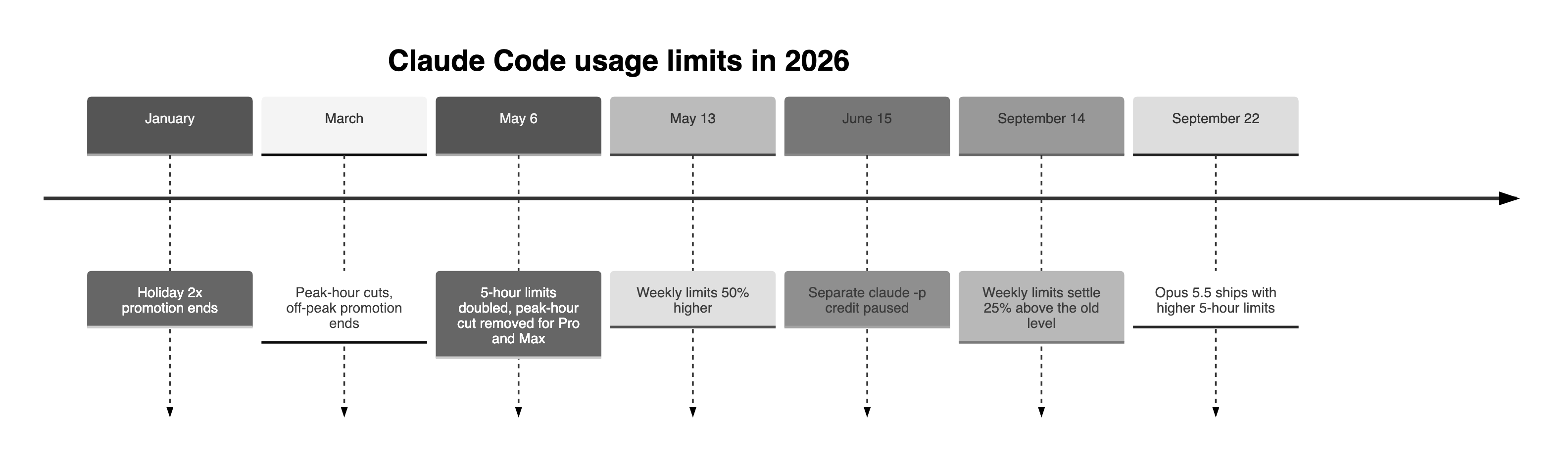
- January: The holiday promotion that doubled limits ended, and developers reported their limits draining faster. Anthropic said only the bonus had ended.
- Late March: Anthropic cut limits during peak hours, and the off-peak promotion ended.
- May 6: Anthropic doubled the 5-hour limits for Pro, Max, Team and seat-based Enterprise, and removed the peak-hour cut for Pro and Max.
- May 13 to September 13: Weekly limits were 50% higher as a promotion.
- June 15: A separate monthly credit for
claude -p, the Agent SDK and third-party apps was due to start, and was paused. That usage still comes from your plan. - September 14: Weekly limits settled at 25% above the pre-May level.
- September 22: Opus 5.5 shipped with higher 5-hour limits, and gave subscribers a one-time rate-limit reset they can save and use whenever they choose.
The September change drew two kinds of headline: a 25% increase, and a 17% cut. Both are true, depending on where you measure from.
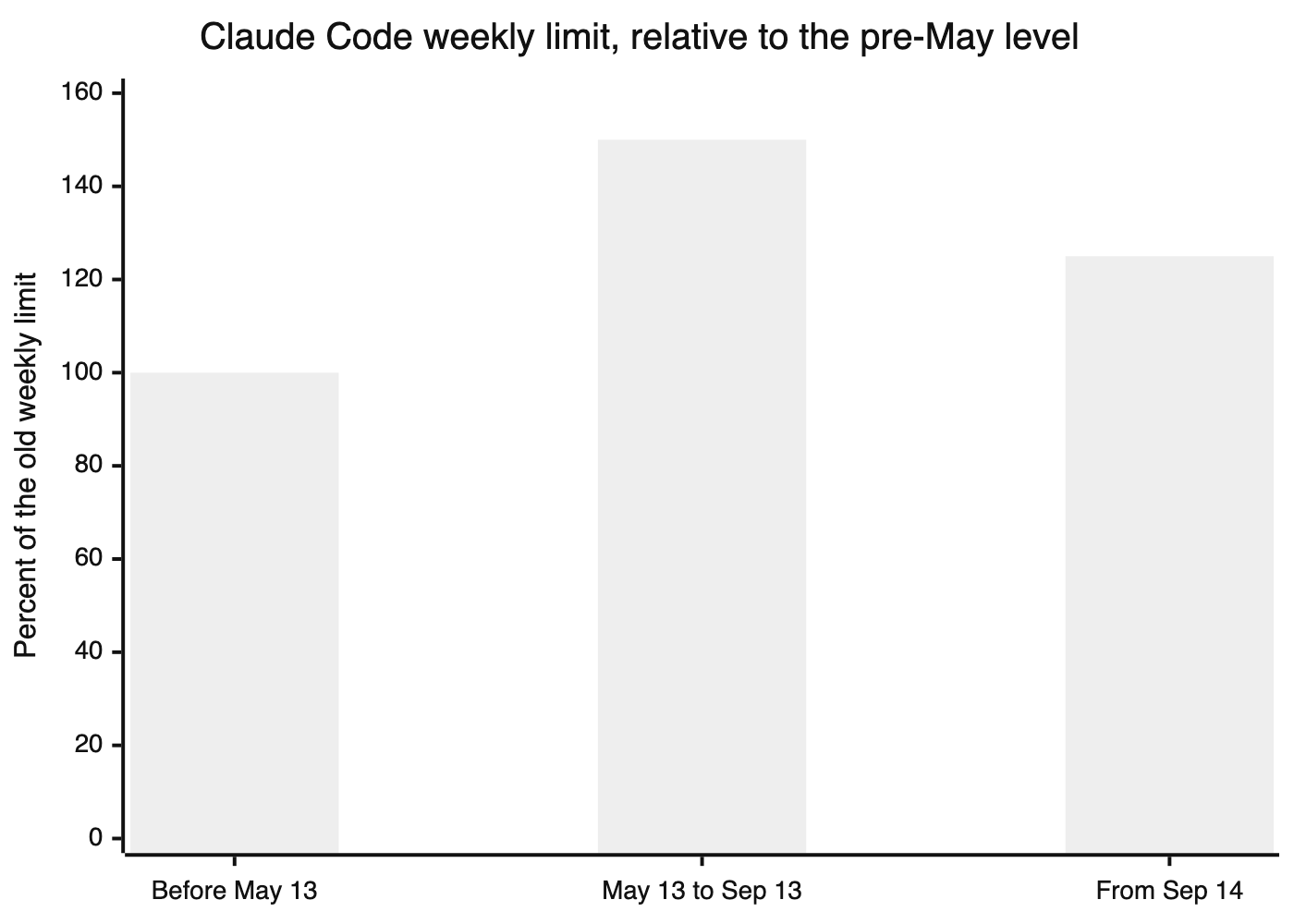
125 is 25% above the old limit and about 17% below the promotion.
Frequently asked questions
Does Claude Code use the same limit as claude.ai?
Yes. Claude Code, claude.ai chats, the IDE extensions, cloud sessions and subagents all draw from one pool with a 5-hour session limit and a weekly limit.
When does the Claude Code weekly limit reset?
At a fixed time Anthropic assigns to your account, not seven days after your first message. /usage shows when yours resets.
Does switching from Opus to Sonnet get me past the limit?
Only past the Opus limit. If you've hit your session or weekly limit, switching models doesn't help until the reset.
Do claude -p and CI count against my subscription?
Yes. The separate credit Anthropic planned for claude -p, the Agent SDK and third-party apps was paused on June 15, so that usage still comes from your plan.
How much does Claude Code extra usage cost?
Usage credits are billed at standard API rates. Opus 5.5 is $4 per million input tokens and $20 per million output tokens, Sonnet 5.5 is $2 and $10, and Fable 5.1 is $10 and $50 (API pricing).
Is Max 20x worth it over Max 5x?
If you hit Max 5x's session limit most days, yes: Max 20x gives four times the session usage for twice the price. If you mostly hit the weekly limit, it's harder to say, because Anthropic doesn't publish the weekly multiples.
What's a good Claude Code alternative when you keep hitting the limit?
Buildful, which we build, is a cloud coding agent on open-weight models for $10 a month, flat, that returns tested pull requests. OpenCode lets you keep a Claude Code-style workflow on a model you choose. Codex makes sense if you already pay for ChatGPT, and Cursor if you'd rather work in an editor.
About the author
Co-founder, Hashnode and currently building Buildful and Bug0.


