So, starting with git, I am a bit fan of git-extras and hub, both save a hell lot of time, while working with terminal git.
There's a cool trick, if you're tired of repeating yourself. Best examples are sudo commands. How often somone type something like
$ service nginx restart
And gets a "You need sudo rights to execute dat?"
So, we type $ sudo service nginx restart again. For faster workflow we arrow up, then ctrl +a to get to the beginning of the line and type sudo. But theres even a shorter way:
$ sudo !!
The double exclamation mark will redo the last typed command.
A really cool trick that also saves a lot of time for creating nested folders via terminal:
mkdir -p parent/{child1,child2,child3}
You can also create files into this folders.
touch !!:2/{yolo.txt,swag.txt}
I am using z to navigate to all my project folders. It basically saves all the recent folders you visit and keeps a history on how often you visit them to create a ranking. You can then simply type
$ z cool-project
and it will navigate you to $ home/User/x/projects/code/cool-project
So, what are your top cli tools, tricks and hacks?
Late into the party and many have already been mentioned (The more it goes the more I use peco for everything).
I still have 3 more to add, that I use and rely heavily on a daily basis:
HTTPie: a CLI, cURL-like tool for humans
I still use curl regularly, but for most of my work I do use HTTPie a lot, it automatically escapes the inputs, makes them easier to add and edit, and the outputs are just gorgeous, much more easy to read
jq , a command line JSON processor, which make it easy to fitler, parse, transform, or just read json. The most basic use is the cat file.json | jq "." which will just treat the complete json. It does automatically beautify/indent it, colorize it. And when you're only interested in some specific json paths, or are searching for values, then the query syntax let you work with JSON directly from the command line. Go have a look at their short tutorial to get the idea of the potential, and you'll realize that's it's the ultimate JSON command line tool (cat is used for illustrative purpose, but with inputs from curl or httpie it becomes a great friend for working with JSON APIs)
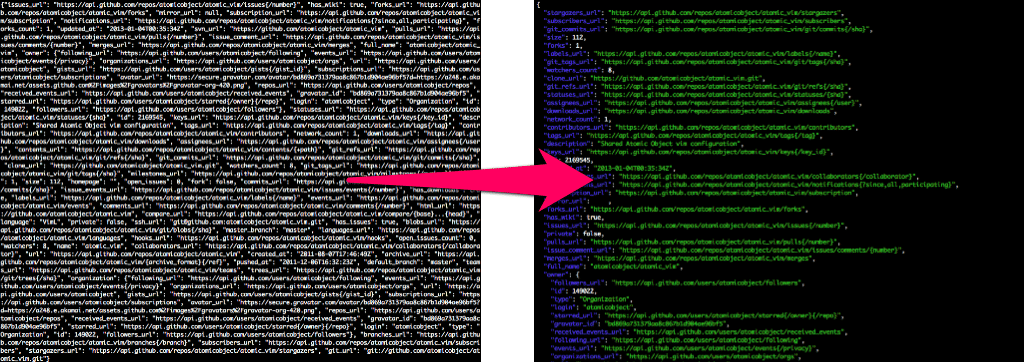
Here's a quick intro to JQ: Handling JSON from the Command Line with Jq
jid, an interactive version of jq. I still use jq for any pipe-stuff or scripts, but jid is so nice for exploratory work in json data!

(On a side note, because I only spotted it very recently and didn't have the chance yet to use it extensively, http-prompt looks like a great tool build from HTTPie

sourced on each machine I use.I've made my day easier by creating my own dotfiles github repository that combines other tools and snippets from other dotfiles.
This is useful to set up instantly your command-line black magic. For a Vagrant user that destroys his vms several times a week, It feels like
For now, I've glued together:
system/ directory.It's a work in progress though.
I don't have hacks or tricks. It's all about autocompletion* and a good memory ;-)
*Autocompletion by fish.

Or if I can't install fish then it's zsh+zsh-completions managed via antigen.
On my Mac iterm2-v3-beta at home and on my Linux server at work, I install and upgrade Apps, Libraries, and Tools via brew or Linuxbrew.
On my DigitalOcean machines, it's fish shell.
On my corporate Windows machine, I run cmder.
I install and update Windows Apps and Tools via chocolatey.
I don't maintain aliases because of the nature that I am running on four different platforms and very different environments. Sharing my hacks to each shell seems to be harder than just remembering some commands. At the end cmd+r or ctrl+r does the job for me.
fish fish is a smart and user-friendly command line shell for OS X, Linux, and the rest of the family.antigen A plugin manager for zsh, inspired by oh-my-zsh and vundle.iterm2 brew The missing package manager for OS Xlinuxbrew The Homebrew package manager for Linuxcmder Lovely console emulator package for Windowschocolatey Chocolatey NuGet is a Machine Package Manager, somewhat like apt-get, but built with Windows in mind.I use bashmarks to navigate in my filesystem using the CLI.
Other than that, the ctrl+r trick to search for already used commands is a must know.
I'm also using zsh and oh-my-zsh with the neat autocomplete plugins (git, docker...).
And I use a lot of shell aliases ! Have a look at my .zshrc config file here: github.com/deviantony/home/blob/master/.zshrc
I have found the following utilities to be amazingly handy:
autojump is a faster way to navigate your filesystem. It works by maintaining a database of the directories you use the most from the command line.
ranger is a console file manager with VI key bindings. It provides a minimalistic and nice curses interface with a view on the directory hierarchy. It ships with "rifle", a file launcher that is good at automatically finding out which program to use for what file type.

If you use emacs there is also an emacs mode that emulates functionality. This and similar other utilities are outlined in my post on the topic.
github/hub: Wrapper for git command that augments it with github aware options. I use it in conjugation with many useful git aliases.
peco Interactive filtering tool to quickly find entries in lists of items
peco can be a great tool to filter stuff like logs, process stats, find files, because unlike grep, you can type as you think and look through the current results.

The aforementioned git aliases link also illustrates usage peco with git to quickly switch to recently accessed branches using git cob.
A code searching tool similar to ack, with a focus on speed.

I don't do much CLI unfortunately, so I really can't help out on this. On my Linux laptop I still want to make a bash script to update/upgrade with an alias, but that's about it, haha
Sorry I don't have any hacks to share :(
Sébastien Portebois
Software architect at Ubisoft
I already answered this a while ago, but I need to update my participations because the more it goes, the less I use peco, which is awesome, in favor or fzf, which is even more awesome, and I believe it's worth sharing this awesomeness ;)
It's fast, it's slick, it get the jobs done. Think of it as a blog+grep built in 2017 ;-)
The repo and readme: github.com/junegunn/fzf
Tons of examples scripts to use it, if you want to get a preview: github.com/junegunn/fzf/wiki/examples
Here's a preview: