Hashnode CLI: Publish and manage your blog from the terminal
You write in markdown. Publishing meant opening the editor and pasting it in. The Hashnode CLI cuts that to one command. Install it, log in through your browser, and publish a file straight from your terminal.
The CLI needs a Pro plan on the publication, and Node.js 20 or later.
How to log in
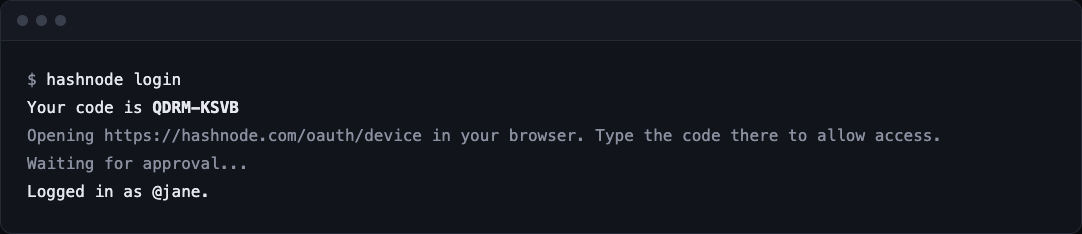
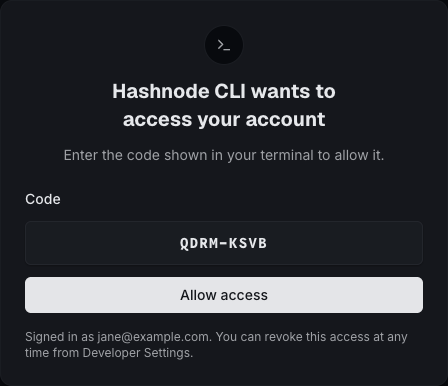
Install it with npm, then run hashnode login. It prints a code and opens your browser. Type the code on the page and allow access. There is no token to copy.
npm install -g @hashnode/cli
hashnode login
A script, a CI job, or a coding agent has no browser. Set HASHNODE_PAT to a Personal Access Token from Settings, Developer instead.
How to publish a post
Find your publication id first:
hashnode --host blog.example.com publication get
Then publish a markdown file with one command:
hashnode -p <id> post create --title "Hello" --content-file post.md --tag java --tag javascript

You get the link back. Want a look before it goes live? Save a draft with draft create, then run draft publish. Upload a cover with image upload. Add --json to any command when a script needs to parse the output.
Where can I see my logins
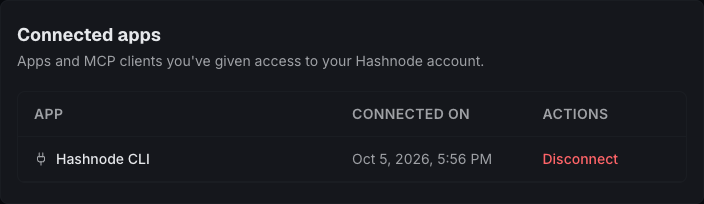
Every login shows up under Connected apps in Developer Settings. Disconnect one and the CLI stops working at once. To end the login from your terminal, run hashnode logout.
Run hashnode --help to see every command.